
Preview: this manual is being updated to cover Shimmer3R. Notes marked TODO are open questions our team is still confirming.
1. Introduction
This document is an accompaniment to the Shimmer3 EMG Unit (called EMG Unit in the rest of this document). Its purpose is to aid the user in getting started with EMG measurements.
The EMG Unit can be configured to measure electrical signals from the skin, including EMG (Electromyograph). Any user who wishes to use Shimmer hardware to record ECG (Electrocardiograph) signals from the skin should refer to the Shimmer3 ECG User Guide, which is available for download from http://www.shimmersensing.com.
The five-wire EMG Unit can be configured to record the electrical activity associated with skeletal muscle contractions; this can be used to analyze and measure the biomechanics of human or animal movement. The EMG Unit is non-invasive, measuring surface EMG and, therefore, the activity it measures is a representation of the activity of the whole muscle or group of muscles whose electrical activity is detectable at the electrode site. The EMG Unit offers a wireless solution for a host of muscle, gait and posture disturbances in an easy to integrate and ergonomically valuable arrangement. Signals are collected from the skin via five wires, which are connected externally to the Shimmer3 EMG Unit, and to which should be attached conventional disposable electrodes. The EMG Unit uses a low-power, multichannel analog front-end especially designed for biopotential measurements, consisting of delta-sigma analog-to-digital converters and programmable gain amplifiers.
2. General Information
2.1. Safety Information
As a precaution it is important to note that the EMG leads are not to be applied to the subject’s body while unit is in a USB dock or multi-charger.
2.2. Pre-Requisites
- A Shimmer3 EMG Unit programmed with appropriate firmware. For example, LogAndStream (v0.6.0 or greater) can be used to stream data over Bluetooth and/or log data to the SD card or SDLog (v0.12.0 or greater) can be used to log data to the SD card; both are available for download from www.shimmersensing.com.
Five DIN snap leads.
9-inch and 18-inch leads are shipped with the EMG Development Kit and EMG Bundles.
Replacements can be purchased from www.shimmersensing.com.
Surface EMG electrodes.
Disposable electrodes are shipped with the EMG Development Kit and EMG Bundles.
For replacements, see www.shimmersensing.com. Alternatively, the Covidien Kendall Disposable Surface EMG/ECG/EKG electrodes 1″ (24mm) or Covidien Kendall Disposable Surface EMG/ECG/EKG electrodes 1 3/8″ (35mm), available on www.bio-medical.com with product codes ‘BRD H124SG’ and ‘BRD H135SG’, respectively, and the Ambu Blue Sensor T electrodes, available from various suppliers, are all suitable options and have been validated for use with Shimmer equipment.
2.3. EMG Unit Specification Overview
- For specifications on the general Shimmer3 part, (i.e. microprocessor, radio, data storage and inertial sensors) of the Shimmer3 EMG Unit, please refer to the Shimmer User Manual.
Shimmer3R: The Shimmer3R EMG Unit uses the same front end, two TI ADS1292R chips, with the gain, data rate, bandwidth and driven ground listed here. For the general part of a Shimmer3R (processor, radio, storage and kinematic sensors), see Shimmer3R hardware in the Shimmer User Manual.
TODO(S3R): Confirm the input range, input protection, current consumption, weight and size figures in this list for the Shimmer3R EMG Unit (its spec sheet gives 31 g and 65 × 32 × 12 mm).
Gain: Configurable (1, 2, 3, 4, 6, 8, 12).
Data rate: software configurable (125, 250, 500, 1000, 2000, 4000, 8000 SPS).Input differential dynamic range1: approx 800 mV (for gain = 6).
Bandwidth2: 8.4 kHz
Ground: Wilson Type Driven Ground
Input Protection: ESD and RF/EMI filtering; Current limiting; inputs include defibrillation protection (survive only, not repeat). NOTE: For inputs Ch1N and Ch1P the defibrillation protection is not present to facilitate Respiration demodulation when the EMG Unit is configured as ECG Unit, refer to Shimmer3 ECG Unit for details.
Connections: Input Ch1N, Input Ch1P, Input Ch2N, Input Ch2P, Reference (Ref).
- All Hospital-Grade 1mm Touchproof IEC/EN 60601-1 DIN42-802 jacks.
Ultra-lightweight (31 grams); Compact Dimensions (65 x 32 x 12 mm).
EEPROM memory: 2048 bytes.
3. Using the EMG Unit
3.1. Basic System Overview
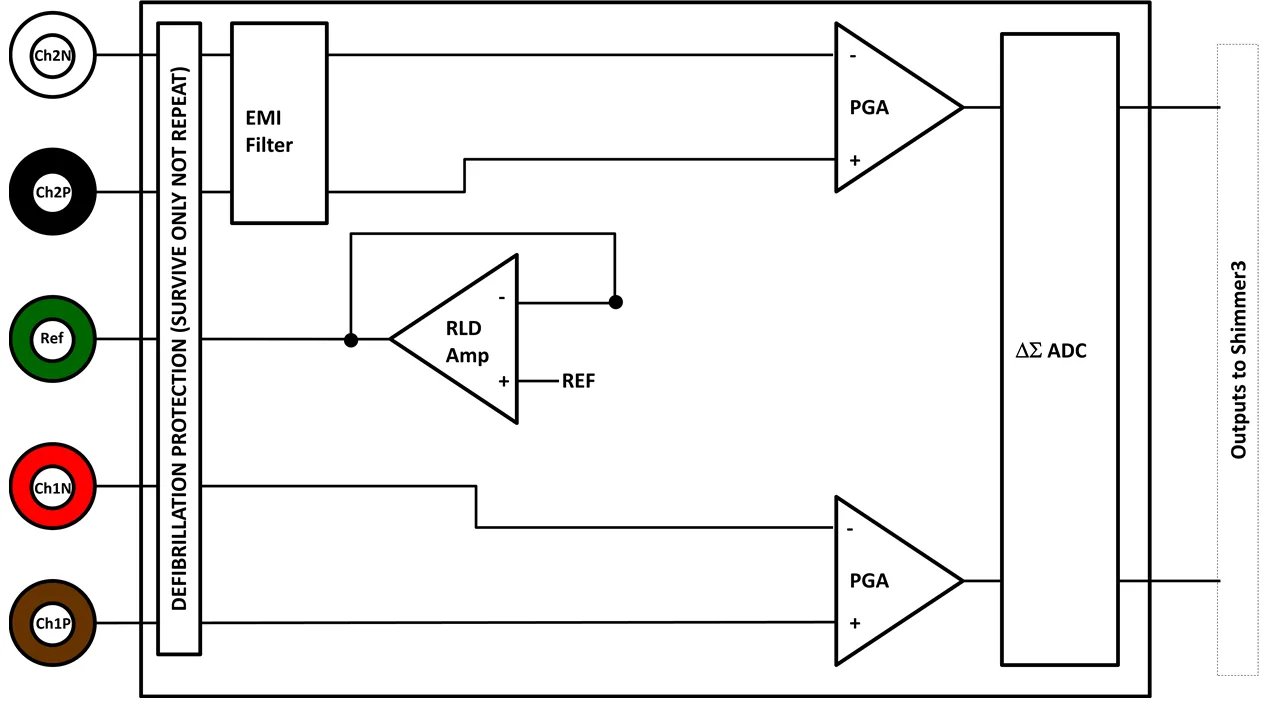
Figure 3‑1: Simplified Block Diagram
Electrodes: Each EMG board connects to Ch2N (white), Ch2P (black), Ref (green), Ch1N (red) and Ch1P (brown) electrodes.
Defibrillation protection: Survive only; not repeat. No defibrillation protection is present for inputs Ch2P and Ch2N to facilitate Respiration demodulation (refer to Shimmer3 ECG User Guide).
EMI Filter: Reduces electromagnetic interference; -3dB filter bandwidth is approximately 3MHz.
Right-Leg Drive Amplifier (RLD Amp): Counteracts common-mode interference (e.g. from mains power lines, fluorescent lights and other sources).
Programmable Gain Amplifier (PGA): Increases amplitude of input signal; seven gain settings available. See Section 4.2 to accurately calculate the gain of your device. Default gain is configurable in software.
∆Σ Analog to Digital Converters (∆Σ ADC): Converts the input analogue signals to a digital representation of this signal by a 24-bit signed integer value to each sample. These values are fed to the Shimmer3 processor to be saved to the SD card or transmitted over Bluetooth.
Common Mode Rejection
Each EMG board connects to five electrodes, namely, a positive and a negative electrode for each for two channels and a neutral reference electrode. The reason for using three electrodes in this way is that the EMG signal amplitude is, typically, very small relative to noise, for example, interference from power lines and nearby electrical sources. The signal picked up by each individual electrode consists of noise from the environment along with the local electrical signal from the muscles at the position of skin contact. The noise from the environment is common to all electrodes, whilst the local electrical signal depends on the electrode’s position. Thus, if one signal is subtracted from another, the common component (the undesired noise) will be cancelled by the subtraction, whilst the local signals (the desired EMG component) will remain after subtraction and can be amplified to make it easier to process. This process is called Common Mode Rejection (CMR) and is used in the Shimmer EMG board.
3.2. EMG Electrode Positioning
The inputs to the EMG Unit are labelled according to the suggested placement, in order to measure EMG data from two channels:
Channel 1:
Ch1N Negative terminal
Ch1P Positive Terminal
Channel 2:
Ch2N Negative terminal
Ch2P Positive Terminal
Reference electrode:
- Ref
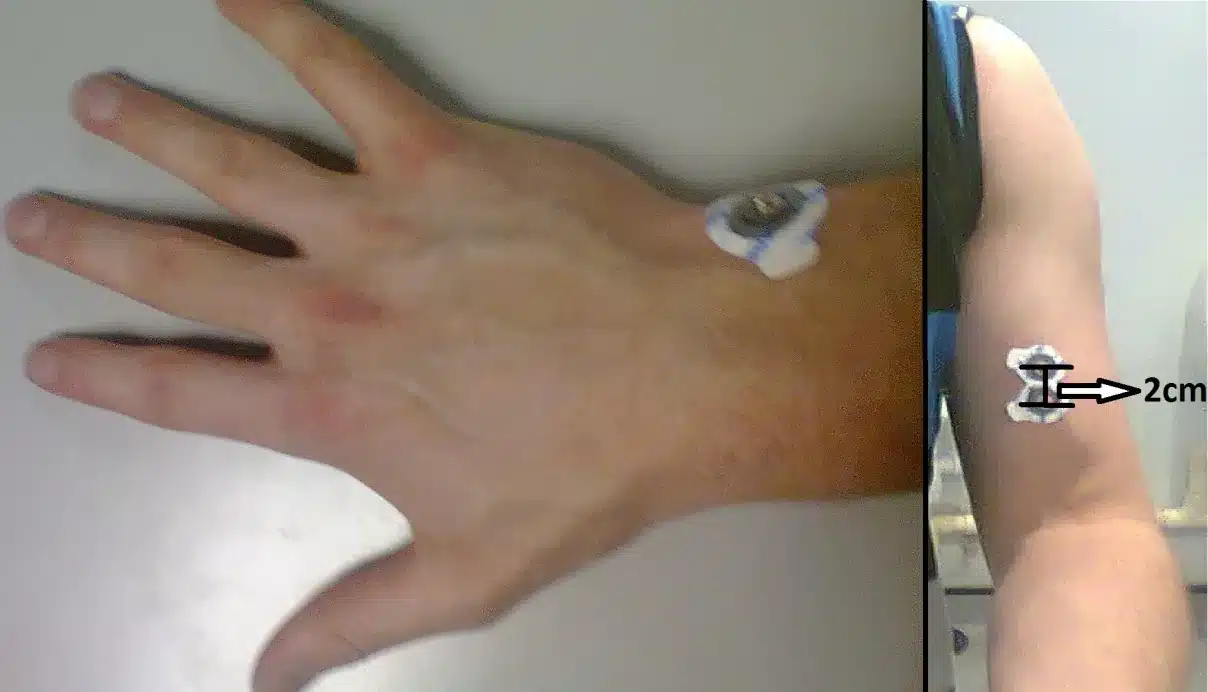
Figure 3‑2: Example positioning of the electrodes for EMG measurement.
Figure 3‑2 shows an example of how the electrodes should be positioned on the body. The positive and negative electrodes should be placed in parallel with the muscle fibres of the muscle being measured, near the centre of the muscle. The reference electrode should be placed at an electrically neutral point of the body, as far away as reasonably possible from the muscle being measured. Bony prominences such as those at the ankle and the wrist are recommended.
The following recommendations should also be noted:
The electrode material should be Ag/AgCl and the ideal centre to centre inter-electrode distance for the positive and negative electrodes is 20mm. The electrode size should not exceed 10mm.
The electrodes must NOT be placed on the tendon of the muscle. As muscles reach their tendon point the fibres become thinner and produce an EMG signal with decreased amplitude.
The electrodes must NOT be placed on the motor point of the muscle. This gives inaccurate data as the signal produced is a summation of both nervous and muscular activity and as such does not just represent the activity of the muscle.
The electrodes must NOT be placed on the outside edges of the muscle. This increases the chance of picking up crosstalk signals from other muscles which are not being measured.
3.3. Configuration Options and Recommended Settings
The EMG Unit contains two ADS1292R chips from Texas Instruments; these have a very wide and varied range of available configuration options. These chips are referred to as “Chip1” and “Chip2” throughout this document. This section aims to provide recommended settings, which will suit the needs of most EMG measurement applications. The experienced user who wishes to have full control over all of the configuration settings should refer to the ADS1292R datasheet from Texas Instruments for more details.
There are two ADS1292R chips on the EMG Unit and each of these chips has eleven bytes of configurable register settings. Ten of these configurable bytes are listed in Table 3‑1 and their recommended values are discussed in this section. The final byte, which pertains to GPIO settings, is dealt with in firmware and not discussed here. Users should note that, for EMG measurement, only one of the ADS1292R chips (referred to as “Chip1”) should be active.
Byte |
Name |
Bit 7 |
Bit 6 |
Bit 5 |
Bit 4 |
Bit 3 |
Bit 2 |
Bit 1 |
Bit 0 |
|---|---|---|---|---|---|---|---|---|---|
0 |
CONFIG1: Configuration Register 1 |
0 |
0 |
0 |
0 |
0 |
Data Rate |
||
1 |
CONFIG2: Configuration Register 2 |
1 |
0 |
1 |
0 |
X 1 |
0 |
INT_TEST |
TEST_FREQ |
2 |
LOFF: Lead-Off Control Register |
0 |
0 |
0 |
1 |
0 |
0 |
0 |
0 |
3 |
CH1SET: Channel 1 Settings |
0 |
Gain1 |
MUX1 |
|||||
4 |
CH2SET: Channel 2 Settings |
0 |
Gain2 |
MUX2 (M2_3, M2_2, M2_1, M2_0) |
|||||
5 |
RLD_SENS: Right Leg Drive Sense Selection |
0 |
0 |
PDB_RLD |
RLD_LOFF_SENS |
RLD Settings (RLD2N, RLD2P, RLD1N, RLD1P) |
|||
6 |
LOFF_SENS: Lead-Off Sense Selection |
0 |
0 |
0 |
0 |
0 |
0 |
0 |
0 |
7 |
LOFF_STAT: Lead-Off Status Selection |
0 |
0 |
0 |
0 |
0 |
0 |
0 |
0 |
8 |
RESP1: Respiration Control Register 1 |
0 |
0 |
0 |
0 |
0 |
0 |
1 |
0 |
9 |
RESP2: Respiration Control Register 2 |
0 |
0 |
0 |
0 |
0 |
0 |
RLDREF_INT |
1 |
The Bit 3 in CONFIG2 denotes “X=0” for SR47-1 revision, and “X=1” for SR47-4 and greater revisions. This feature has been configured automatically in both LogAndStream 0.11.0 and SDLog_v0.19.0 (and newer).↩︎
Table 3‑1 ADS1292R configuration register bytes – recommended values
Table 3‑1 lists the recommended values of the ADS1292R configuration register bytes. The values of the individual bits are listed in the columns labelled Bit 7 (MSB), Bit 6, and so on to Bit 0 (LSB). The recommended values of some sets of bits, like multiplexer (MUX) settings, channel gain settings and others, differ depending on the type of signal being measured (e.g. ECG or EMG), and others, like output data rate and test signal, depend on the user’s preferences.
Data Rate
The Data Rate for each chip can be set by modifying the three LSBs of the CONFIG1 register (Byte 0). Table 3‑2 lists the valid options and their corresponding data rate value in units of samples per second (SPS). For EMG, a data rate of 500 SPS or more is recommended, although the needs of a given application may vary.
| Data Rate (SPS) | DR2 | DR1 | DR0 |
|---|---|---|---|
| 125 | 0 | 0 | 0 |
| 250 | 0 | 0 | 1 |
| 500 (recommended) | 0 | 1 | 0 |
| 1000 | 0 | 1 | 1 |
| 2000 | 1 | 0 | 0 |
| 4000 | 1 | 0 | 1 |
| 8000 | 1 | 1 | 0 |
| DO NOT USE | 1 | 1 | 1 |
Table 3‑2 EMG Data Rate options
Gain
The Gain setting can be configured independently for each of the two data channels on each chip by modifying bits 4 – 6 of the CH1SET byte for channel 1 and of the CH2SET byte for channel 2, respectively. The gain bits for channel 1 of a given chip are listed as G1_2 (MSB), G1_1 and G1_0 (LSB) in Table 3‑1, whilst the equivalent for channel2 of the chip are listed as G2_2, G2_1 and G2_0, respectively. These are collectively referred to as Gx_2, Gx_1 and Gx_0, respectively, in Table 3‑3, which lists the valid options and the corresponding gain value for each. For EMG, a gain value of 12 is recommended.
| Gain | Gx_2 | Gx_1 | Gx_0 |
|---|---|---|---|
| 6 (default) | 0 | 0 | 0 |
| 1 | 0 | 0 | 1 |
| 2 | 0 | 1 | 0 |
| 3 | 0 | 1 | 1 |
| 4 | 1 | 0 | 0 |
| 8 | 1 | 0 | 1 |
| 12 (recommended) | 1 | 1 | 0 |
| DO NOT USE | 1 | 1 | 1 |
Table 3‑3 EMG Channel Gain options
Input Multiplexer
The multiplexer (MUX) settings can be configured independently for each of the two data channels on each chip; the MUX bits for channel 1 of a given chip are listed as MUX1_3 (MSB), MUX1_2, MUX1_1 and MUX1_0 (LSB) in Table 3‑1, whilst the equivalent for channel2 of the chip are listed as MUX2_3, MUX2_2, MUX2_1 and MUX2_0, respectively. Table 3‑4 lists the recommended MUX configuration for each chip and channel for EMG data collection.
| Chip | MUX1_3 | MUX1_2 | MUX1_1 | MUX1_0 | MUX2_3 | MUX2_2 | MUX2_1 | MUX2_0 |
|---|---|---|---|---|---|---|---|---|
| Chip1 | 1 | 0 | 0 | 1 | 0 | 0 | 0 | 0 |
| Chip23 | 0 | 0 | 0 | 1 | 0 | 0 | 0 | 1 |
Table 3‑4 Recommended MUX settings for EMG
Right-Leg Drive (Common-mode Rejection)
The right-leg drive (RLD) settings determine the voltage that should be used at the input of the right-leg drive amplifier for common-mode interference rejection and can be configured independently for each chip. The RLD Settings bits for a given chip are listed as RLD2N, RLD2P, RLD1N and RLD1P in Table 3‑1. For EMG configuration, the recommended setting is to choose the inverted RLD signal (RLDINV), provided by circuit elements outside of the chip to close the negative feedback loop on Chip1 and no RLD signal on Chip2. This can be achieved by setting the configuration listed in Table 3‑5.
| Chip | RLD2N | RLD2P | RLD1N | RLD1P |
|---|---|---|---|---|
| Chip1 | 0 | 0 | 0 | 0 |
| Chip2 | 0 | 0 | 0 | 0 |
Table 3‑5 Recommended RLD channel selection settings for EMG
The PDB_RLD bit of the RLD_SENS byte (byte 5, bit 5) determines if the RLD buffer is powered on (1) or not (0).
The RLD_LOFF_SENS bit of the RLD_SENS byte (byte5, bit 4) determines if the lead-off sense function is enabled (1) or disabled (0).
The RLDREF_INT bit of the RESP2 byte (byte 9, bit 1) controls the RLDREF signal source for the RLD amplifier. If the value of the bit is 0, the reference signal is fed externally. If the value of the bit is 1, an internally generated reference signal is generated.
For EMG data collection, the settings in Table 3‑6 are recommended for PDB_RLD, RLD_LOFF_SENS and RLDREF_INT.
| Chip | PDB_RLD | RLD_LOFF_SENS | RLDREF_INT |
|---|---|---|---|
| Chip1 | 1 | 0 | 1 |
| Chip2 | 0 | 0 | 0 |
Table 3‑6 Recommended RLD settings for EMG
Test Signal
In order to test the EMG output channels, a test signal can be internally generated by each chip. This signal can either be a DC voltage or a 1Hz square wave. To enable the test signal, the two LSBs of the CONFIG2 byte (byte 1, bits 1-0) for each chip should be set as in Table 3‑7. Furthermore, the MUX1 or MUX2 bits should be set to 0000 so that the test signal will appear on channel 1 or channel 2, respectively.
| Test signal | INT_TEST | TEST_FREQ |
|---|---|---|
| DC test signal | 1 | 0 |
| 1 Hz square wave test signal | 1 | 1 |
| No test signal | 0 | 0 |
Table 3‑7 Test signal settings for EMG
4. Measuring EMG Signals
4.1. Best Practice on How to Acquire an EMG signal
Skin Preparation
A good electrode to skin contact is essential for accurate surface EMG readings. The skin should be cleaned with alcohol or sanitizer to remove any inhibitory particles. If hairs are obstructing the contact they should be shaved for the best readings.
Research
It is good practice to research the anatomy of each muscle you wish to measure. An understanding of each muscle’s shape, fibre directionality, motor points, tendon positions and insertion points will help you to prepare a high quality EMG reading.
Sampling Frequency
Although the sampling frequency is entirely up to the user, it should be noted that the surface EMG spectrum is 20Hz-400Hz however the majority of the signal lies in the 20Hz-250Hz spectrum. Therefore for many applications a sampling rate of 512Hz will ensure high quality reproducibility of the actual summation of the muscle’s activity however a higher sampling rate may be required for certain applications.
4.2. Signal Calibration
The ADC output for each channel from the EMG Unit has a signed 24bit digital format. The relationship between the ADC output and the EMG Signal in mVolts is given by the formula:
$`(ADC\ Output – ADC\ Offset).ADC\ Sensitivity = EMG\ Signal\ in\ mVolts.Gain`$ Equation 1
In order to convert the ADC output signal to mVolts which is the standard unit for an EMG signal, the above formula can be rearranged as follows:
$`EMG\ Signal\ in\ mVolts = \ \frac{\left( (ADC\ Output – ADC\ Offset).ADC\ Sensitivity \right)}{Gain}`$, Equation 2
where
$`ADC\ Sensitivity = \ \frac{Vref}{ADC\ Max} = \frac{2420\ mVolts}{2^{23} – 1}`$. Equation 3
Considering that the ADC sensitivity is known and that the ADC Output is measured from the Shimmer, in order to calculate the EMG signal in mVolts, the values for the Gain and ADC Offset must simply be inserted into Equation 2.
The nominal value for the ADC offset of the EMG Unit data channels is 0 and the gain is software configurable (see Section 3.3). For most applications these values are sufficiently accurate. If improved accuracy is required for a given application, then the gain and ADC Offset of each of the EMG Unit channels can be measured.
ADC Offset Measurement
To determine the offset of each channel, the relevant inputs for that channel should be connected to each other. For example to determine the Channel 1 offset, the Ch1P and Ch1N inputs should be connected to each other. The ADC offset for the Channel 1 is then calculated as the mean ADC output on the EMG Ch1 of the Shimmer with the Ch1P and Ch1N inputs connected together. This can easily be found by saving uncalibrated data to a file and then calculating the mean value. The offset for other channels is calculated similarly.
Gain Measurement
In order to determine the gain for the EMG sensor channels, a sine wave signal from a signal generator should be applied to the sensor electrodes. The channels should be calibrated separately, with the sine wave signal applied to the appropriate pair of electrodes in each case. It is recommended to use a signal with amplitude ±1 mV approx (2 mV peak-to-peak) and frequency between 0.05Hz and 159Hz. The gain for each channel may differ.
The gain for each channel is calculated as follows
$`Gain = \ \frac{\left( (Max\ ADC\ Output – ADC\ Offset).ADC\ Sensitivity \right)}{Max\ Input\ Signal\ in\ mVolts}`$ Equation 4
where the ADC Offset and ADC Sensitivity are as defined previously, Max ADC Output is the maximum value of the uncalibrated data on the channel of interest and Max Input Signal in mVolts is the half wave amplitude of the input sine-wave signal (e.g. 1mV when using a signal of ±1 mV).
5. Common EMG Signal Processing Techniques
The type of EMG signal processing a user will require is entirely dependent on the specific requirements of their application. The techniques outlined below are intended to aid the user in getting started with investigating the specific type of EMG signal processing they require and to provide them with information on common methodologies which can improve signal quality. For a more in depth overview of EMG signal processing techniques it is recommended to consult literature, such as that authored by Raez et al. [1]. Each section below features examples of appropriate literature on the subject matter to aid the user with some of the types of signal processing they may require.
Please note that software solutions for EMG signal processing are not currently provided by Shimmer and the information below is intended as a starting point for the new user to aid their software development. Should you require customised software solution, please contact the Shimmer team.
5.1. Filtering [2]
In order to remove signal interference from mains electricity, notch filtering is recommended. To do this a band-stop filter should be adjusted to block the local mains frequency. Eliminate the 50Hz frequency in most parts of the world or 60Hz frequency in the Americas. The APIs and Instrument Drivers, provided by Shimmer for development of software in Java/Android, LabVIEW, Matlab and C#, include the implementation of optional mains filtering in the example code.
Note: Notch filtering of an EMG signal is not recommended if the filter cut-off frequency lies within the bandwidth of interest as it will remove EMG signal of interest along with the noise. In such cases it is recommended to take measures to reduce the levels of noise at the noise source.
The ADS1292R chips on the EMG Unit provide a DC-coupled measurement. Therefore, high pass filtering with a cut-off frequency of 5Hz or greater is highly recommended.
A band-pass filter can be useful for the elimination of low frequency noise such as motion artifact as well as high frequency noise sources which are outside the bandwidth of interest. Typically, a filter with a lower cut-off frequency (Fc,low) of 20Hz and a higher cut-off frequency (Fc,high) of 400-800Hz (depending on the user’s range of interest) is used.
Care should be taken in the design of filters and it should be remembered that the filters may impose the requirement for a settling time after data collection starts. The APIs and Instrument Drivers, provided by Shimmer for development of software in Java/Android, LabVIEW, Matlab and C#, include the implementation of optional high and low pass filtering in the example code.
Figure 5‑1 below shows an EMG signal with and without filtering. The top signal (blue) is a noisy calibrated EMG signal with no filtering applied. The signal was captured from the calf muscle using Multi Shimmer Sync for Windows software, at a sampling frequency of 1024 Hz.
The middle signal (orange) is the same signal with a Butterworth band-pass filter applied, with Fc,low set to 20Hz and Fc,high set to 511Hz. It can be observed that the motion artifact has been removed.
The bottom signal (also blue) is the band-passed signal with a notch filter applied (Fc = 50Hz, bandwidth (BW) = 1Hz). It can be observed that a substantial level of noise has been removed and the EMG signal remains.
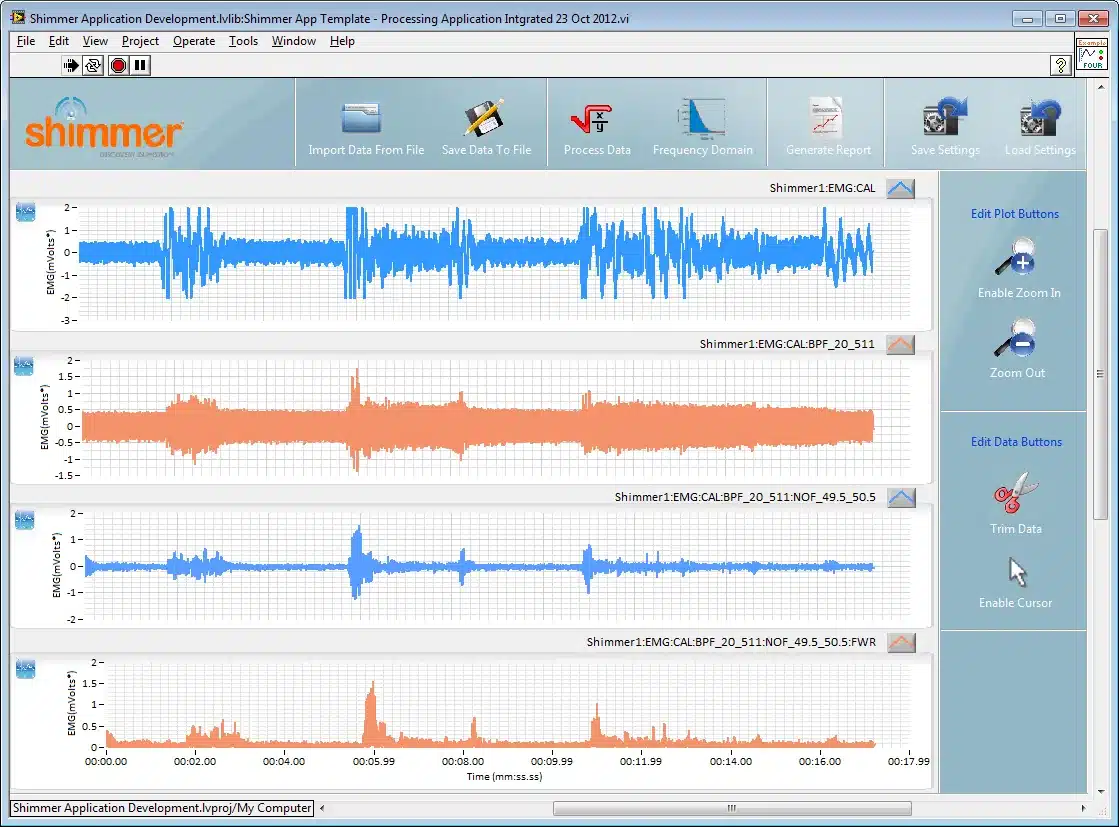
Figure 5‑1: Bandpass Filtering and Notch Filtering of Calibrated EMG Data
5.2. Extracting the Linear Envelope of an EMG Signal [3]
The linear envelope of an EMG signal is an easy-to-interpret representation of the raw signal. Among other uses, it is used to detect when a muscle is active and to give an indication of the overall level of activity in a particular muscle at any time.
There are a variety of methods to extract the linear envelope of an EMG signal. The most commonly used is to firstly apply full wave rectification to the signal and to subsequently pass it through a low pass filter (Fc = 1-10Hz). The effects of lowering the cut-off frequency of the filter are that the resulting signal will have smoother, rounded edges but will contain less information from the original EMG signal.
Alternatively, averaging techniques on a moving window of samples can be used: calculating the root mean square or mean of the moving window of values are the most commonly used methods. Increasing the number of samples in the moving window will produce a linear envelope with smoother, rounded edges but will reduce the amount of information contained in the processed signal. Figure 5‑2 below shows the linear envelope of a raw EMG signal with a moving window selected at 100ms.
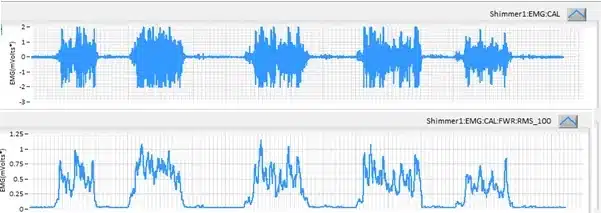
Figure 5‑2: A raw EMG signal and its linear envelope.
5.3. Integration Techniques [3]
Continuous integration is the integration of the current sample with all previous samples in the signal. It is commonly used to represent total energy expenditure in the associated muscle.
Periodic reset integration is similar to continuous integration except that, after a defined period, the integral value is reset to 0 and the integration process begins again. It is commonly used to compare the energy output of a muscle over a number of pre-defined periods.
Threshold reset integration is also similar to continuous integration except that when the integral value reaches a predefined threshold the integral value is reset to 0 and the integration process begins again. It is commonly used to monitor how long it takes for a muscle to expend a pre-defined amount of energy.
Figure 5‑3 below shows graphs of a signal with the application of continuous integration (top, blue), periodic reset integration with a period of 100ms (middle, orange) and threshold reset integration with a threshold of 0.8mV (bottom, blue).
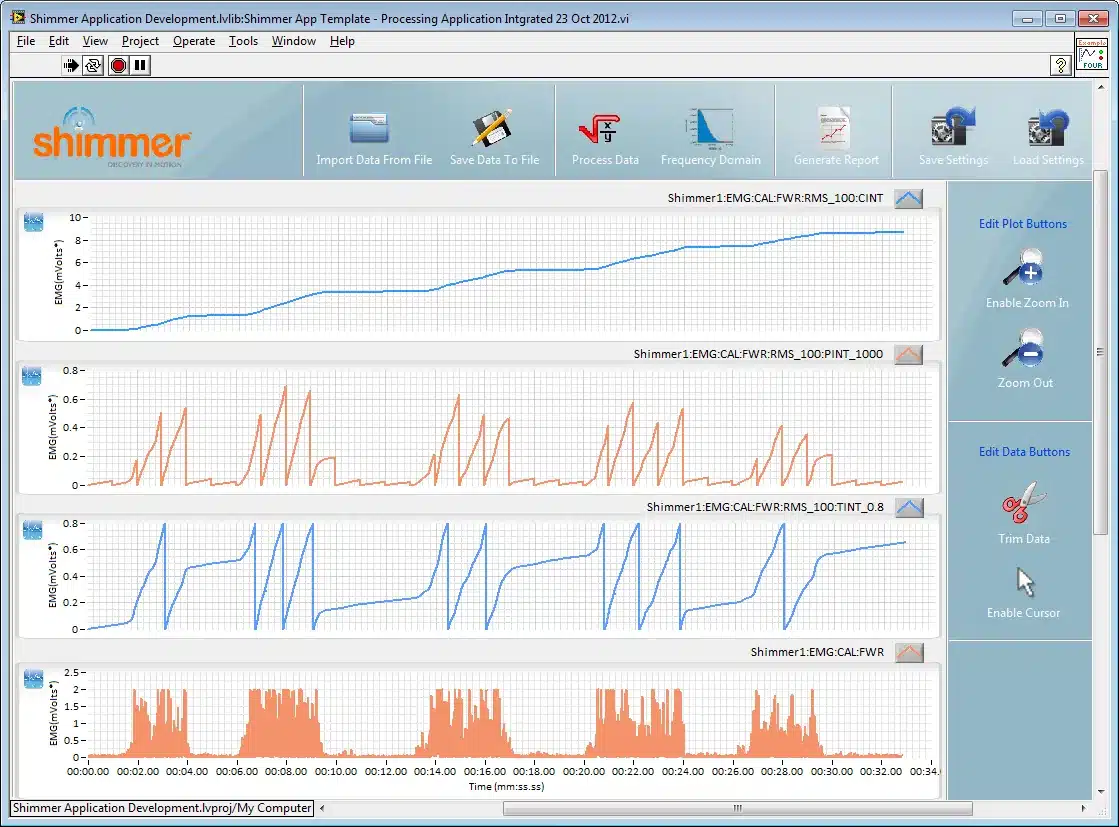
Figure 5‑3: Continuous integration, periodic reset integration and threshold reset integration
5.4. Normalisation [3, 4]
Normalisation is used to eliminate variability across subjects, electrode placement and day to day differences in measures of the same muscle site, when carrying out research using EMG. Maximum voluntary contractions compared to strain gauge data are often used to associate electrical muscular activity with strength and subsequently compare the EMG readings from a variety of subjects.
5.5. Frequency Domain Analysis [3, 5]
Analysis of the EMG signal in the frequency domain allows the user to extract information about which particular type of muscle cells are firing at any one instance. In simplified terms; Type ll, fast twitch cells cause the higher frequency components of the signal and Type l, slow twitch cells cause the lower frequency portion of an EMG signal.
As a muscle fatigues it becomes more reliant on Type l cells. Using this fact and monitoring the median frequency of an EMG signal allows the user to monitor muscular fatigue (It is important to note that the amplitude of an EMG signal/linear-envelope does not necessarily reduce as a muscle fatigues, therefore frequency analysis is the only method for monitoring muscle fatigue with EMG).
Frequency analysis of an EMG signal is one of the most complex signal processing techniques to implement and analyse. As such an in depth literature review of the topic should be conducted before utilising the associated techniques.
6. Hardware Considerations
6.1. Board Layout
*Note: > TODO(S3R): The board layout figures in this section show the Shimmer3 EMG Unit. Add the Shimmer3R EMG Unit layout, and confirm that the electrode connectors (J10–J15) and the channel assignment below are the same.
Note: For Shimmer3 EMG hardware purchased prior to July 2015, please refer to Appendix 10.1 of this document.
Figure 6‑1 and Figure 6‑2 show the board layout for the EMG Unit, with components labelled. The two ADS1292R chips are labelled EU1 and EU2 and are referred to in the documentation as Chip1 and Chip2, respectively. The area on the board within with the orange dashed lines is the part of the circuitry of the EMG Unit that is described in this User Guide. The area on the board outside of the orange dashed lines is the circuitry of the Shimmer3, described in the Shimmer User Manual.
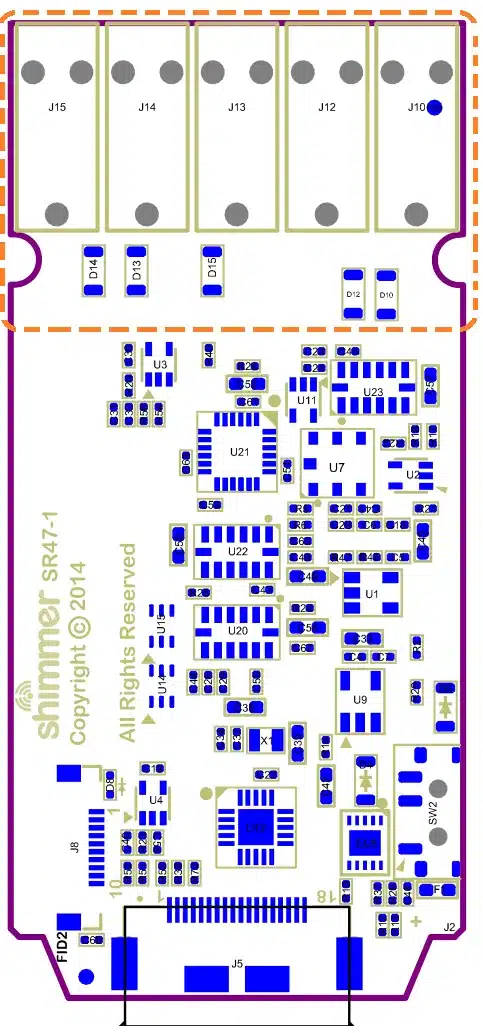
Figure 6‑1: EMG Board Layout (bottom view)
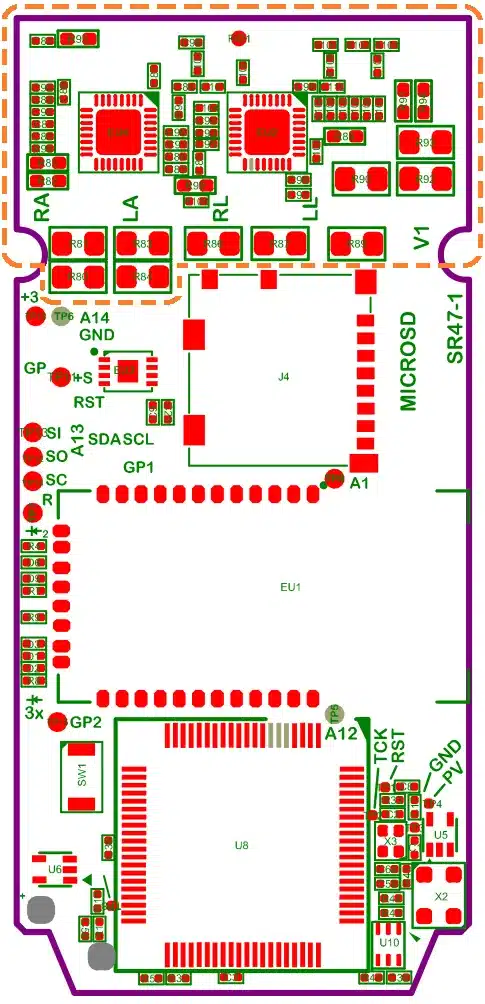
Figure 6‑2: EMG Board Layout (top view)
6.2. Channel assignment
When the MUX settings recommended in Section 3.3 of this document are configured, the channel assignment for EMG is as follows:
Chip1 Channel 1: J15 (Brown) – J14 (Red).
Chip1 Channel 2: J12 (Black) – J10 (White).
Reference: J13 (Green).
Chip2: not active for EMG configuration.
6.3. Data considerations
The reference voltage for the ADS1292R chips is 2.42 V; this value should be used for conversion of raw data to voltage.
TODO(S3R): Confirm the ADS1292R reference voltage on Shimmer3R.
7. Firmware Considerations
Shimmer3R: The Shimmer3R firmware is at https://github.com/ShimmerResearch/shimmer3r-firmware. The ExG configuration bytes and data format, shared by both generations, are documented in the configuration reference and the streaming data format reference.
Users with firmware development experience who wish to develop custom firmware for the EMG Unit should follow the example provided in the LogAndStream application, source code for which is available on the Shimmer Github repository at https://github.com/ShimmerResearch/shimmer3/tree/master/apps.
8. Troubleshooting
8.1. Verifying That Your EMG Unit Works
To verify that your EMG Unit is functioning correctly, the test signal in the ADS1292R chips should be used. Please refer to Section 3.3 of this document for details on how to configure each chip to output the test signal on one or both channels. When the test signal is configured, the output of each channel should follow the signal exactly (i.e. the output should be a DC signal or a square wave at 1 Hz, with an amplitude of ±1 mV).
Using any Shimmer user interface (e.g. ShimmerCapture, Multi Shimmer Sync) you can view the signal. These and other software applications are available from the Downloads section of the Shimmer website4.
Firstly, configure the software to stream EMG data and then select sampling rate and a location to write to file. A typical EMG sampling rate is 512Hz or more but, for this test, you can use any desired sampling frequency. Run the software and observe the data stream. The output display should match the test signal. If all channels are outputting the test signal properly, your EMG Unit is functioning correctly.
If the test signal is successfully transmitted to the channels but you continue to have problems with measure EMG signals, you should check electrode positioning and that the electrodes are all securely attached to both the skin and to the EMG Unit.
8.2. Signal Quality
A disconnected electrode or connector (lead-off) will adversely affect the measured EMG signal. This occurrence can be detected by the ADS1292R chip. Further information on this advanced functionality will soon be provided by Shimmer. In the meantime, interested users may refer to the ADS1292R datasheet for more details.
9. References
[1] Raez M.B.I., Hussain M.S., Mohd-Yasin F. (2006). Techniques of EMG signal analysis: detection, processing, classification and applications. Biological Procedures Online. 8 (1), p11-35.
[2] De Luca C.J., Gilmore D.L., Kuznetsov M, Roy S. (2010). Filtering the Surface EMG: Movement Artifact and Baseline Noise Contamination. Journal of Biomechanics. 43 (1), p1573-1579.
[3] Konrad, P. (2005). The ABC of EMG: A Practical Introduction to Kinesiological Electromyography. USA: Noraxon Inc..
[4] Halaki, M. & Ginn, K. (2007). Normalization of EMG Signals: To Normalize or Not to Normalize and What to Normalize to? In: *Computational Intelligence in Electromyography Analysis – A Perspective on Current Applications and Future Challenges *. U.S.A. : InTech. p175-194.
[5] Sadoyama T, Miyano H. (1981). Frequency analysis of surface EMG to evaluation of muscle fatigue. European Journal of Applied Physiology & Occupational Physiology. 47 (3), p239-
10. Appendices
10.1. Legacy Hardware
The information in this section is relevant for Shimmer3 EMG hardware purchased prior to July 2015. Figure 10‑1 and Figure 10‑2 show the board layout for the EMG Module, with components labelled. The two ADS1292R chips are labelled EU1 and EU2 and are referred to in the documentation as Chip1 and Chip2, respectively.
Board Layout
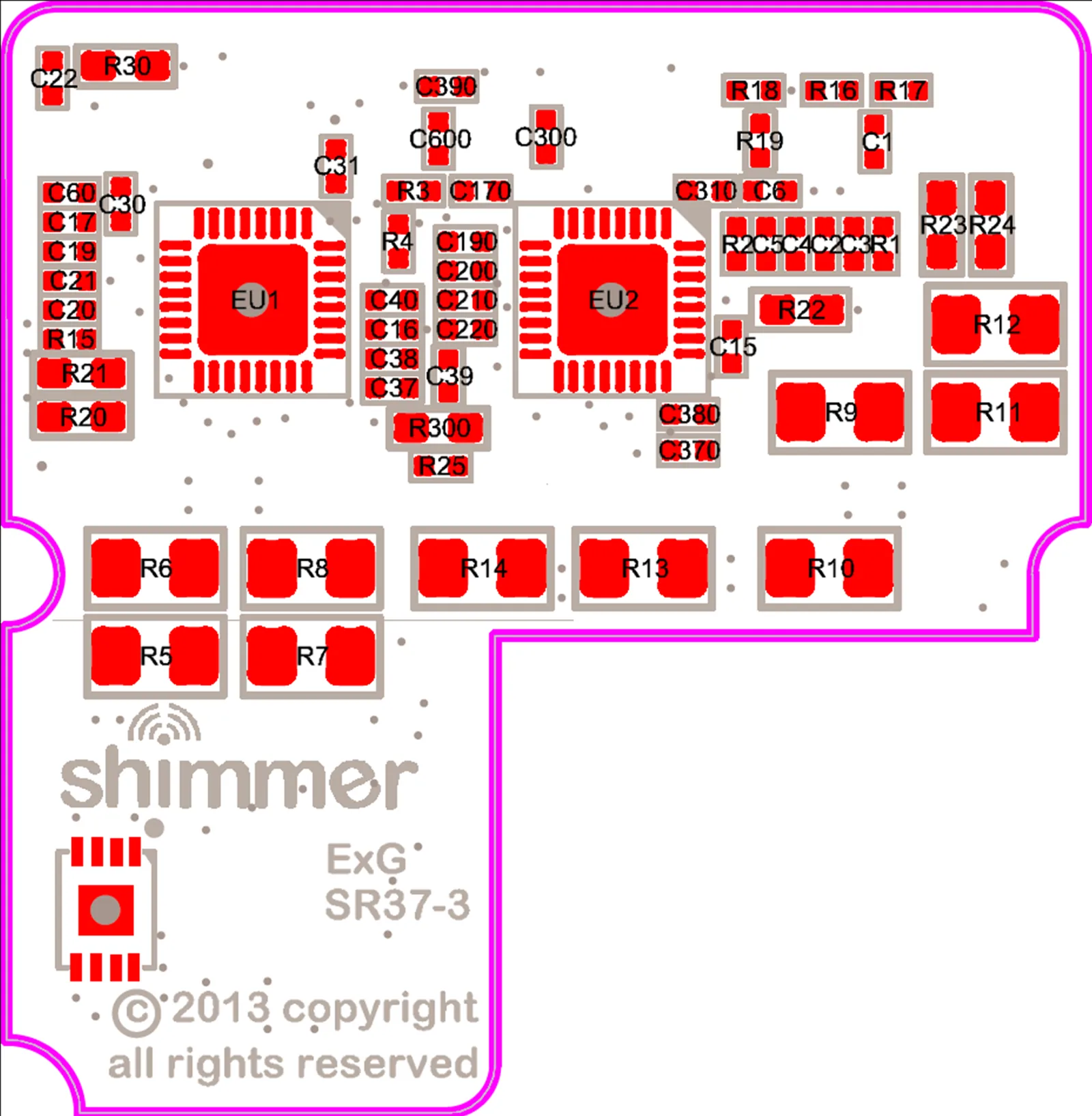
Figure 10‑1 EMG Board Layout (bottom view)
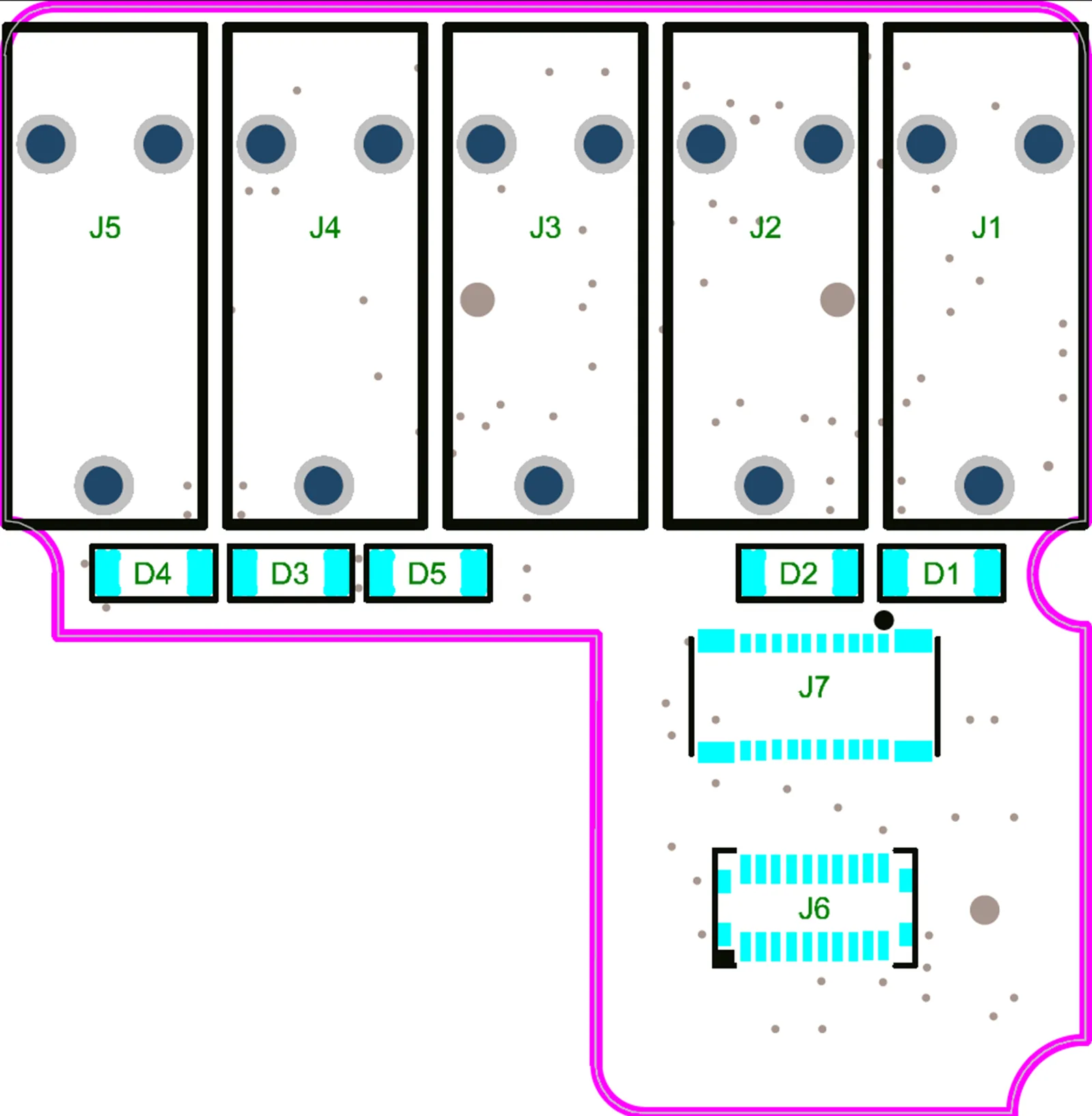
Figure 10‑2 EMG Board Layout (top view)
Channel assignment
When the MUX settings recommended in Section 3.3 of this document are configured, the channel assignment for EMG is as follows:
Chip1 Channel 1: J5 (Brown) – J4 (Red).
Chip1 Channel 2: J2 (Black) – J1 (White).
Reference: J3 (Green).
Chip2: not active for EMG configuration.
Troubleshooting
Troubleshooting information that only applies to legacy hardware: If you do not see the test signal on one or all of the configured channels, you should ensure that the EMG Module is securely connected to the Shimmer3 mainboard. Please refer to Section 10.2 of this document for instructions on how to open the EMG module. You should then verify the configuration settings of your device.
For devices purchased between September 2014 and July 2015, the EMG Module is permanently fixed to the Shimmer3 mainboard. Removal of the expansion board from the mainboard should not be carried out under any circumstances. Doing so will cause damage to one or both of the boards and any necessary repairs will not be covered by warranty.
For devices purchased before September 1st, 2014, it was possible to disconnect the EMG Module from the Shimmer3 mainboard. For these devices, Shimmer recommends an adhesive to secure the connection between the Shimmer3 mainboard and Expansion Boards. The adhesive that is used by Shimmer during assembly is called Superdots (www.superdots.com). We use the Ultra Tak variety. With Superdots applied, the expansion boards can still be removed and swapped out, if required, as the adhesive does not go solid but has a rubbery consistency, allowing it to be removed. However, customers should remember that frequently removing expansion boards is not recommended and can cause damage to the connectors. Superdots also provides some shock absorbtion.
Shimmer fits the Superdots by stretching them around the edges of the Expansion Board. This ensures that the adhesive doesn’t prevent the connectors from making a good connection and there is enough adhesive to secure the boards together but not to interfere with the fit.
Note: Shimmer does not supply Superdots.
10.2. Opening the Shimmer3 expansion enclosure
Whilst the Shimmer3 enclosures can be opened to allow users to change the SD card, it is important to note that the plastic enclosures are not designed for regular opening and closing. In particular, it is recommended that the screws not be removed and reinserted on a regular basis as damage to the plastic by over-use of the screw mechanism will occur. Furthermore, the expansion board connectors can be damaged by disconnecting and reconnecting, resulting in the loss of communication with the expansion board.
For (legacy) devices purchased between September 2014 and July 2015, the EMG Module will be permanently fixed to the Shimmer3 mainboard. Removal of the expansion board from the mainboard should not be carried out under any circumstances. Doing so will cause damage to one or both of the boards and any necessary repairs will not be covered by warranty.
For (legacy) devices purchased before September 1st, 2014, it is possible to disconnect the EMG Module from the Shimmer3 mainboard. Please note, however, that this is not recommended.
Whether the EMG Module is permanently fixed to the Shimmer3 mainboard or not, if the enclosure must be opened to replace the SD card, care must be taken not to damage the expansion board connection, which could result in loss of communication between the expansion board and the Shimmer3 mainboard. Please refer to the Shimmer assembly video on our YouTube channel5.

Legal notices
EMG User Guide
Revision 1.12
Legal Notices and Disclaimer
Redistribution IS permitted provided that the following conditions are met:
Redistributions must retain the copyright notice, and the following disclaimer. Redistributions in electronic form must reproduce the above copyright notice, this list of conditions and the following disclaimer in the documentation and/or other materials provided with the document.
Neither the name of Shimmer Research, or Realtime Technologies Ltd. nor the names of its contributors may be used to endorse or promote products derived from this document without specific prior written permission.
THIS DOCUMENT IS PROVIDED BY THE COPYRIGHT HOLDERS AND CONTRIBUTORS “AS IS” AND ANY EXPRESS OR IMPLIED WARRANTIES, INCLUDING, BUT NOT LIMITED TO, THE IMPLIED WARRANTIES OF MERCHANTABILITY AND FITNESS FOR A PARTICULAR PURPOSE ARE DISCLAIMED. IN NO EVENT SHALL THE COPYRIGHT OWNER OR CONTRIBUTORS BE LIABLE FOR ANY DIRECT, INDIRECT, INCIDENTAL, SPECIAL, EXEMPLARY, OR CONSEQUENTIAL DAMAGES (INCLUDING, BUT NOT LIMITED TO, PROCUREMENT OF SUBSTITUTE GOODS OR SERVICES; LOSS OF USE, DATA, OR PROFITS; OR BUSINESS INTERRUPTION) HOWEVER CAUSED AND ON ANY THEORY OF LIABILITY, WHETHER IN CONTRACT, STRICT LIABILITY, OR TORT (INCLUDING NEGLIGENCE OR OTHERWISE) ARISING IN ANY WAY OUT OF THE USE OF THIS DOCUMENT, EVEN IF ADVISED OF THE POSSIBILITY OF SUCH DAMAGE.
**