
Preview: this manual is being updated to cover Shimmer3R. Notes marked TODO are open questions our team is still confirming.
1. Introduction
Shimmer3R: This manual covers LogAndStream on both Shimmer3 and Shimmer3R. The two are built from one shared code base and behave the same way; where Shimmer3R differs, a Shimmer3R: note says so. The Shimmer3R firmware is released as LogAndStream for Shimmer3R (LogAndStream_Shimmer3R_vx.yy.zzz). Its version numbers are independent of the Shimmer3 firmware’s and cannot be compared with them. A Shimmer3R reports hardware version 10, against 3 for Shimmer3; both report firmware identifier 3 (LogAndStream).
This document is an accompaniment to the LogAndStream Firmware for Shimmer3. No previous development experience is required.
LogAndStream firmware is a complete data recording solution that merges features from our previous Shimmer3 firmware releases. The LogAndStream firmware facilitates logging of data from a Shimmer3 to the on‑board SD card while also providing the ability to simultaneously stream data over wireless connection to a Bluetooth-enabled PC. The firmware allows for full user configuration of the Shimmer3 using a configuration file stored on the SD card, or over Bluetooth using the provided ConsensysBASIC PC application.
It is recommended that the LogAndStream firmware be used in conjunction with the ConsensysBASIC or ConsensysPRO software applications (available for download from the Shimmer website1).
 Whenever the warning symbol appears throughout this document, it denotes a new, modified or deprecated feature in v0.4.0 (or later).
2. Changes in latest release
Note: This chapter describes LogAndStream v0.11.x for Shimmer3. Release notes for every later release are published with the firmware: https://github.com/ShimmerResearch/shimmer3-firmware/releases for Shimmer3 and https://github.com/ShimmerResearch/shimmer3r-firmware/releases for Shimmer3R.
TODO(S3R): Decide whether to keep this chapter, or replace it with the links above.
This release is a major update to v0.10.0 with the following updates/improvements:
2.1. Bug Fixes
Sensing stopped when docked
This release fixes a bug in SetupDock() whereby the shimmer unit is forced to stop sensing if “docked”.
2.2. New Features
SR47-4 (New ExG build) support
New SR47-4 (ExG) devices now supported. ADS1292R clock lines are reconfigured for this device such that both ADS chips share the same clock line. Interrupt for Chip 2 is disabled such that both chips are serviced by chip 1’s data ready pin interrupt routine alone. Default configuration bytes now also cater for SR47-4 (and newer) Shimmer ExG devices. Checks EEPROM info and applies ADS clock chip configuration bit accordingly.
An additional 1 second time-out is now applied in firmware- see page 63 of ADS1292R datasheet for more info.
3. Scope of this User Manual
The purpose of this User Manual is to guide the user through the features of the LogAndStream firmware and to provide the required instructions to configure the data logging options, configure the data streaming options and to parse the recorded and received data. The User Manual does not provide an extensive explanation of the source code for the firmware.
4. Pre-Requisites
The LogAndStream firmware can be used with any Shimmer3 device that has a connected microSD card. For Shimmer3 compatibility, the chosen microSD card must be less than 32 GB in capacity, not be an XC (eXtended Capacity) card and it must support 1‑bit SPI mode. Please refer to the Shimmer3 MicroSD Media Guide on our website2 for more information.
A Shimmer Dock or Consensys Base is required to allow access the SD card on the Shimmer from the PC for configuration of logging preferences and data transfer. Please note that legacy (black) Shimmer docks, sold with Shimmer2r and earlier hardware, are not suitable for this purpose.
Note: Please see LogAndStream_Shimmer3_v0.11.0 for full release notes and accompanying firmware.
For a wireless connection to the Shimmer3, a Bluetooth enabled PC and a software application like ConsensysBASIC or ConsensysPRO is required to interface with Shimmer3 and receive the streamed data. The ConsensysBASIC and ConsensysPRO applications allow a user to fully configure the Shimmer3 whilst providing the ability to save streamed data locally to the PC in real-time.
For more information on the Shimmer3 platform, please refer to the Shimmer User Manual which is available for download at www.shimmersensing.com.
5. Installation
Shimmer3R: Consensys installs LogAndStream for Shimmer3R over USB, through the Shimmer3R’s built-in USB bootloader; see Programming a Shimmer in the Shimmer User Manual.
Install the LogAndStream firmware v0.11.0 image (LogAndStream_Shimmer3_v0.11.0.txt) onto a Shimmer3 device, using the ConsensysBASIC or ConsensysPRO software applications, available on our website1.
6. Firmware Features
As stated previously, the LogAndStream firmware provides a seamless integration of logging Shimmer3 data to an on-board microSD card and the ability to stream Shimmer3 data to “host” device via Bluetooth. The LogAndStream firmware has been designed such that a user can still utilise the Shimmer3 in a purely Bluetooth streaming or SD-logging mode if they desire. What sets the LogAndStream firmware apart from previous firmware releases is its ability to perform both SD-logging and Bluetooth streaming operations simultaneously.
A Shimmer3 programmed with LogAndStream firmware can be in one of five states: Idle, BT Connected, BT Streaming, BT Streaming + SD Logging or SD Logging – as shown in Figure 6‑1. The active states form two operational branches from which the user can choose to operate the Shimmer3 device – one initiated by a Bluetooth connection (blue shaded area in Figure 6‑1) and the other based on SD Logging operation (orange shaded area in Figure 6‑1).
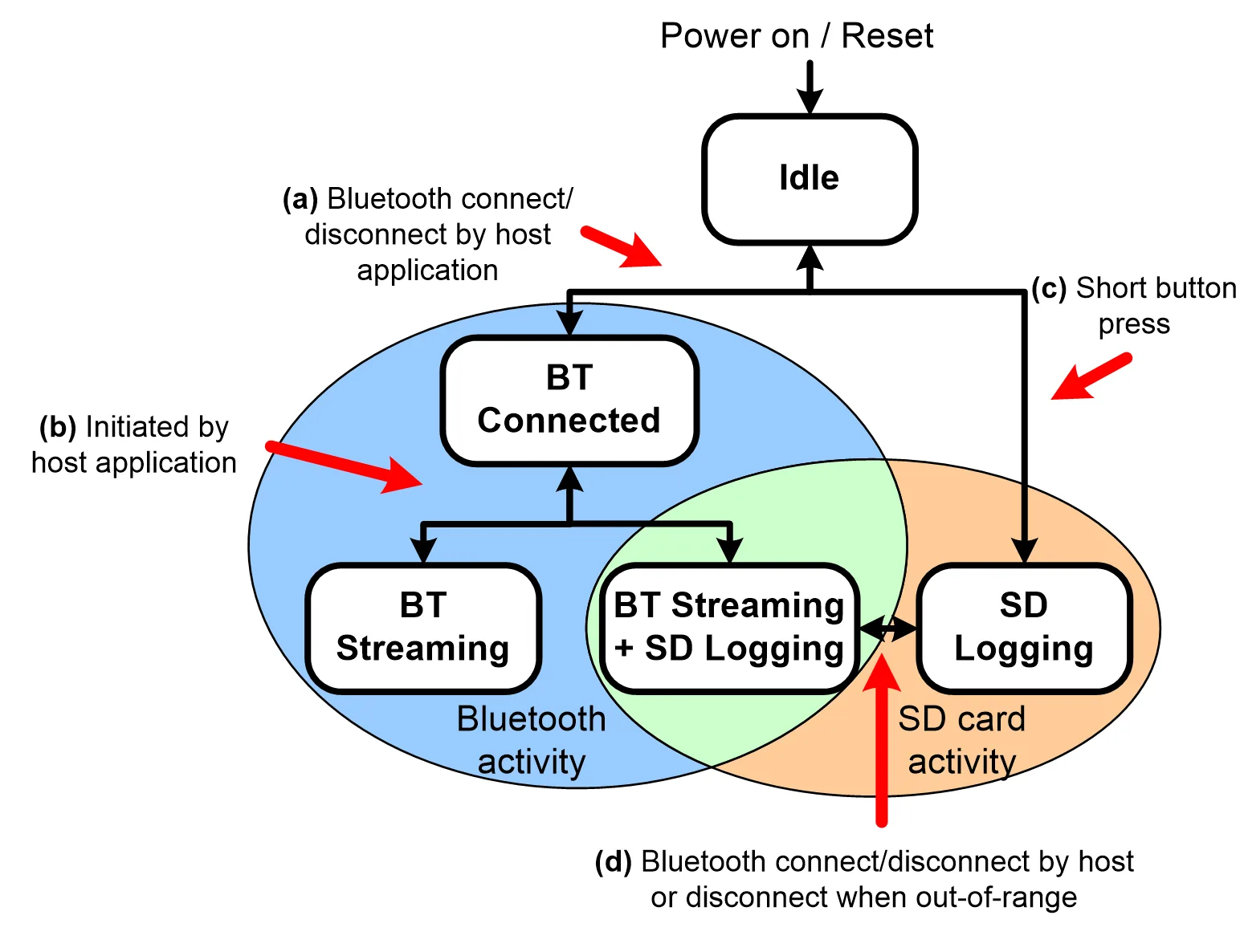
Figure 6‑1 LogAndStream firmware operational hierarchy.
The key feature of the LogAndStream firmware can be viewed at the intersection of the two active branches (green shaded area in Figure 6‑1). From a “host” application, the user can select to stream Shimmer3 sensor data over a Bluetooth connection at the same time as saving it locally to the on‑board microSD card. An instance where this is of key benefit is the case where, in the process of data collection, a Shimmer3 might travel out of range from the “host” device. In this circumstance, the Shimmer3 will continue to save data to the microSD card such that there will be no break in the data recording. Similarly, during normal SD logging operation, continuous Bluetooth streaming is not always desirable or required. By combining Bluetooth support with SD logging capability, the new LogAndStream firmware now facilitates the ability for the user to check the recording activity of a Shimmer3 at any stage during SD logging operation – without interrupting the data recording. It should be noted, however, that the Bluetooth radio on the Shimmer will remain active, regardless of the connection state, so in use cases where battery life is an important factor, SDLog should be chosen over LogAndStream firmware.
6.1. General operation
State 1 – Idle
Note: To use the Bluetooth features of the LogAndStream firmware, the Shimmer3 device must first be paired with a “host” device (e.g., a PC), as outlined in the Shimmer3 User Manual.
When a Shimmer3, programmed with LogAndStream firmware, is first powered on or reset, it enters the Idle state. How long it will remain in the Idle state depends on the configuration of a parameter called “Undock Start” (see Section 7.2.3 for more details).
The ‘paths’ referred to below are indicated in Figure 6‑1.
- To enter BT Connected state, a Bluetooth connection must be initiated by a “host” side application (e.g., ConsensysBASIC). A subsequent disconnection of the Bluetooth connection will send the Shimmer3 back to the Idle state.
There are two ways of reaching the SD Logging state from the Idle state:
If Undock Start is disabled, the device will remain in the Idle state until either a connection is made over the Bluetooth link (i.e., by opening a serial connection), or the user instigates a single button press which will initiate SD logging mode. Similarly, another short button press will terminate SD Logging mode and return the Shimmer3 to Idle state.
If “Undock Start” is enabled, the Shimmer3 will progress directly from Idle mode into SD Logging mode after a power-on or reset condition.
State 2 – BT Connected
In the BT Connected state, the Shimmer3 can process various commands to configure its sensors and sampling parameters, set calibration parameters, send configuration settings back to the “host” (PC, mobile or other) and start sampling. When the Shimmer3 is in the BT Connected, BT Streaming or BT Streaming + SD Logging states, there can be active communication between the Shimmer3 and the host over the Bluetooth serial connection. Packets of bytes are sent in both directions and these can consist of commands, responses or data.
- The host application (e.g., ConsensysBASIC) allows the user to fully configure the Shimmer3 and choose between either BT Streaming or BT Streaming + SD Logging recording modes.
State 3 – BT Streaming
When a command to start BT Streaming is received, the Shimmer3 enters the BT Streaming state and starts sampling data from its sensors and sending that data over the Bluetooth link. This state will continue until one of the following events occurs:
A command to stop logging is received, whereupon the Shimmer3 returns to the BT Connected state.
The serial connection is closed, sending the Shimmer3 back into the idle state.
The Shimmer3 goes out‑of‑range from the “host” device for a certain period (≈ 150 s), whereupon the Shimmer3 will also return to Idle state.
State 4 – BT Streaming + SD Logging
The BT Streaming + SD Logging state can be initiated by using the “host” application (e.g., ConsensysBASIC). When the Shimmer3 enters the BT Streaming + SD Logging state, the Shimmer3 will start sampling data from its sensors and send this data over the Bluetooth link as well as store it locally in raw file format to the microSD card (see Section 8).
The Shimmer3 will continue in this mode until one of the following occurs:
A stop logging command is received from the “host”. The Shimmer3 will return to the BT Connected state.
In the event of either a Bluetooth disconnection, the serial port being closed or the Shimmer3 travelling out of range for a certain period (≈ 150 s), the Shimmer3 will automatically enter the SD Logging state (as illustrated by “Path (d)” in Figure 6‑1).
State 5 – SD Logging
In the SD Logging state, the Shimmer3 will continuously read data from its sensors and store this data locally to a raw data file in its on-board microSD card (for more information see Section 8). The Shimmer3 will remain open to a Bluetooth connection by a host device, whereupon the Shimmer3 will automatically switch to the BT Streaming + SD Logging state without interruption to the SD logging data stream.
6.2. Real-time clock
Shimmer3R: Shimmer3R keeps the real-world clock across a reset; Shimmer3 loses it at every reset. A Shimmer3R loses the clock only when it loses power completely, and then restarts from 2000-01-01, so host software should still set the clock on every connection. The timekeeping reference describes both generations.
In LogAndStream v0.3.0, the capability to save the ‘real-world’ time from a PC to the Shimmer was introduced. This feature allows simple synchronisation with external events or third party devices by providing a common clock timestamp at the beginning of a logging session. The firmware indicates if the real-time clock has been set on the Shimmer. A blue/green LED indicator on the Shimmer will intermittently flash to indicate to the user that the real time clock has not been set (see Section 6.5 for LED indicators).
The recommended method to set the real-time clock from a PC to a Shimmer device is to use Shimmer ConsensysBASIC or ConsensysPRO software. The time is set via the UART interface with Shimmer Dock or Consensys Base or over Bluetooth in the Consensys software applications. In the case of a user who wishes to set the time outside of a Shimmer application, more details should be sought in the source code for LogAndStream Firmware on the Shimmer github repository3.
6.2.1. Important considerations for real-time clock
Please note the following factors that will affect the reliability of the real-time clock timestamps.
The real-time clock is saved in volatile memory. This means that, if the Shimmer is powered off or reset, the real-world time will be lost.
The real-time clock setting is implemented as a once-off operation that relates the timestamp on the Shimmer’s local clock to the timestamp on the PC. This setting cannot measure or correct for drift of the Shimmer’s internal clock. It is recommended that a data collection session should begin as soon as possible after the real-time clock has been set on the Shimmer. Similarly, if the PC time is being set on multiple devices (Shimmer or third party devices), this should be done on all devices within as short an interval as possible to reduce the effect of clock drift.
Note: It is not critical for the real-time clock setting to be present on the Shimmer in order to record data to the Shimmer’s SD card. The LED sequence will change to the “logging” mode after undock start or push button start and will return to the error LED sequence when logging ceases (see section 6.3 for LED indicators).
6.3. Time synchronisation
Each Shimmer device has its own independent on-board clock which is reset to zero whenever the device is powered on or reset and which is subject to drift, caused by component-specific differences and environmental factors, like temperature. It is important to note that LogAndStream firmware does not support time synchronisation, due to conflicts between the requirements for host communication and Shimmer-Shimmer communication. Users who require synchronisation (e.g., if the duration of a data collection session is too great to accept the clock drift) are advised to use the SDLog firmware and Shimmer software applications that enable sync (e.g ConsensysPRO)
6.4. Start/Stop Logging
6.4.1. Dock (automatic start)
This is the default way for the Shimmer3 to start and stop logging data to the SD card and is enabled if the “Undock Start” option is enabled from ConsensysBASIC or ConsensysPRO or ShimmerCapture (i.e., configuration file line entry: “userbutton=0”). With this configuration, if the Shimmer is powered on or reset while it is not on the dock, the following process will begin immediately:
The Shimmer unit will go into standby mode for up to 3 seconds.
The Shimmer unit will read the configuration file and create the required directories on the SD card.
The Shimmer unit will start logging.
Alternatively, if the Shimmer is powered on or reset while it is on the dock, the three steps above will begin as soon as the Shimmer is removed from the dock.
In either case, logging will continue until the Shimmer unit is reset, powered off, replaced in the dock or the battery runs out.
Repeatedly resetting the Shimmer unit will result in multiple logging sessions on the SD card.
Warning: Please note that it is not recommended to dock the Shimmer unit while it is being configured by the firmware. Ideally, the Shimmer unit should either be powered off or in standby mode whenever it is being placed on the dock.
6.4.2. User button (manually start/stop logging)
This option relies on the orange user button on the Shimmer3 enclosure to start/stop logging.
With this setting, undocking the Shimmer unit or powering it on when it is off the dock will trigger the same steps 1 and 2 as above (i.e., standby for 3 seconds followed by configuration). However, logging will not start until the user button is pressed by the user.
If the user button is pressed while the Shimmer unit is on the dock or Base or connected over Bluetooth, it will have no effect on logging. Otherwise, if the user button is pressed while the Shimmer unit is undocked (and not logging), logging will start immediately.
Logging will continue until one of the following occurs: the user button is pressed, the Shimmer unit is reset, powered off, replaced in the dock, the battery runs out or the Shimmer is told to stop by a host application, whichever happens soonest.
Repeatedly pressing the user button (with Push Button Start enabled) or docking and undocking the Shimmer3 unit (with Undock Start enabled) will result in multiple logging sessions on the SD card.
6.5. LED indicators
Shimmer3R: Shimmer3R has one RGB LED in each location instead of five single-colour LEDs, with the same patterns. “RTC not set” is a single cyan LED rather than green and blue together, and a purple flash on the lower LED, which Shimmer3 cannot show, means the Shimmer3R is entering its bootloader. The LED feedback reference lists every state for both generations.
TODO(S3R): The current firmware shows steady red while charging, where the tables below say yellow; see the LED feedback reference, section 4.4. Confirm from which version and update the tables.
The Shimmer3 has five LEDs in two locations: the lower LED location (location A) which contains the green (b), yellow4 and red LEDs; and the upper LED location (location B) which contains the green (a) and blue LEDs.
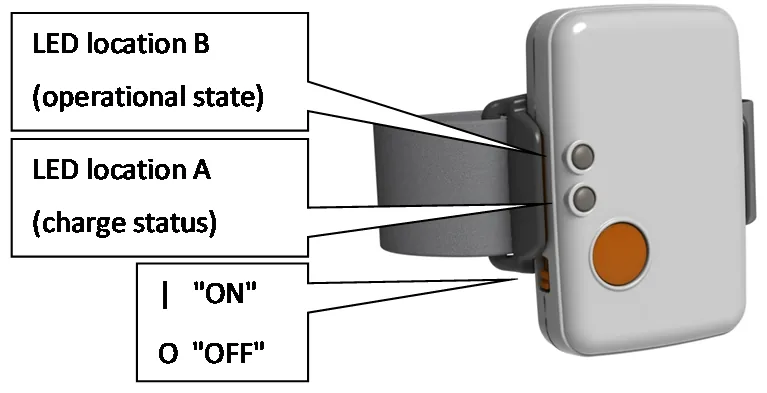
Figure 6‑2 Shimmer3 in enclosure.
The two upper LEDs are used to indicate state of operation for the LogAndStream firmware. The status of each depends on whether the Shimmer3 is in a docked or undocked state, as shown in Table 6‑1 below.
LED Pattern |
Description |
||
|---|---|---|---|
|
Standby |
|
Blue 0.1s ON/2s OFF |
Bluetooth Connected |
|
Blue Solid ON |
|
Streaming only |
|
Blue 1s ON / 1s OFF |
|
RTC not set or general error |
|
0.1s Blue/0.1s Green |
|
|
Configuring |
|
Green 0.1s ON/ 0.1s OFF |
RTC error |
|
0.1s Blue/0.1s Green |
|
SD error |
|
0.1s Red/0.1s Yellow |
|
Streaming and Logging |
|
1s Blue/1s Green |
|








Note: The Shimmer unit should never be placed in the dock while the operational LED’s indicate that it is configuring as this may cause a file-system error. Once configuration has begun, you must power off or reset the Shimmer unit before docking.
Note: It is not recommend to place the Shimmer3 unit in the dock while it is logging data as this can cause SD card access problems. Once logging has begun, you must power off or reset the Shimmer3 unit before docking.
Note: The above SD error LED sequence is present in LogAndStream_v0.9.0 and later. Older versions of LogAndStream couple both SD and RTC errors into a 0.1s Blue/0.1s Green LED flashing sequence.
Note: There are a couple of reasons for the Shimmer to enter “Error” mode.
If the real-world time has not been set on the Shimmer.
- It is not critical for the real-world time setting to be present on the Shimmer in order to record data to the Shimmer’s SD card. The LED sequence will change to the “logging” mode after undock start or push button start.
 LED sequence for real-time clock status only in LogAndStream v0.6.0 or later.
- It is not critical for the real-world time setting to be present on the Shimmer in order to record data to the Shimmer’s SD card. The LED sequence will change to the “logging” mode after undock start or push button start.
If no configuration file is present on the SD card.
If the Shimmer is unable to access the SD card for some reason e.g. if the SD card is corrupt (try reformatting the SD card but note that this will delete all of the data from the SD card)
The lower three LEDs are exclusively used across all Shimmer3 firmware as a battery charge indicator and will show the colour corresponding to the charge status. As above, the status of each LED depends on whether the Shimmer3 is in a docked or undocked state. If the Shimmer3 is on a dock or multi-charger and is powered on, the battery charge status indicator will show a solid LED. If the Shimmer3 is undocked, the corresponding LED will flash, as described below in Table 6‑2.
LED Pattern |
Description |
||
|---|---|---|---|
|
Full Charge |
|
Green Solid ON |
Charging |
|
Yellow Solid ON |
|
|
Full Charge |
|
Green 0.1s ON/5s OFF |
Medium Charge |
|
Yellow 0.1s ON/5s OFF |
|
Low Charge |
|
Red 0.1s ON/5s OFF |
|





7. Using the Firmware
7.1. Bluetooth Streaming
LogAndStream is controlled over Bluetooth with one-byte commands, each followed by any parameters it needs. The Shimmer acknowledges every command it receives. There are four kinds:
- Set commands write configuration: enabled sensors, sampling rate, sensor ranges and rates, calibration parameters and so on.
- Get commands read configuration and status back.
- Action commands start and stop streaming and logging (for example START_STREAMING_COMMAND, START_SDBT_COMMAND), or toggle an LED.
- In-stream commands (GET_STATUS_COMMAND, GET_DIR_COMMAND, GET_VBATT_COMMAND) can be sent while the Shimmer is streaming or logging; their responses arrive among the data packets.
START_STREAMING_COMMAND starts streaming only, and works only while the Shimmer is neither logging nor streaming. START_SDBT_COMMAND starts or resumes streaming and logging together; use it to stream from a Shimmer that is already logging.
Both generations use the same protocol. The complete, current reference, with every command, its bytes, the packet structure, the in-stream responses and the firmware versions that introduced each feature, is the Shimmer3 / Shimmer3R Bluetooth Communication Protocol:
- Opcode table
- Status, ACK/NACK and in-stream responses
- Streaming data flow, including how to separate data packets from in-stream responses
- Command reference
- Connection session workflow
Most users never need these details: Consensys and the Shimmer APIs (Java/Android, C#, Python, MATLAB, LabVIEW) implement the protocol.
Shimmer3R: A Shimmer3R accepts the same commands over both Classic Bluetooth (serial port profile) and Bluetooth Low Energy. It also has commands Shimmer3 ignores, to list, read and delete the files on its SD card over Bluetooth; see the SD file transfer reference.
7.1.1. Bluetooth Latency
Delays due to Bluetooth transmission should be taken into account when streaming data, particularly if the data is to be synchronised on the receiver side. Our lab tests have shown up to 100 ms of latency with considerable variation (> 50 ms). These measures result from multiple FIFOs in the data path, as expected in wireless data acquisition systems using conventional computing devices for the data end-points. Actual performance is strongly impacted by end-point system configuration and load.
7.2. Configuration
To use this firmware image, the user must provide the desired configuration parameters of each Shimmer. It is recommended that Shimmer software applications (e.g. ConsensysBASIC or ConsensysPRO) are always used for configuration of sensors for logging, in order to avoid errors introduced in the development of third party software. However, the configuration parameters can be sent to the Shimmer outside of the provided applications, by following the guidelines throughout this section.
Since v0.4.0, there are three options available for configuring the Shimmer, as outlined in the following section.
7.2.1. Configuring a device
Configuration via Bluetooth
The recommended method of writing the calibration parameters to a Shimmer device, programmed with LogAndStream firmware is to connect via the ConsensysBASIC or ConsensysPRO software application (available from the Shimmer website1) and use the graphical interface to configure the device via a Bluetooth connection. Assuming that LogAndStream v0.4.0 (or later) firmware is programmed on the devices, the new configuration parameters will automatically be written to the appropriate file on the SD card, following the file structure outlined later in this section.
Configuration via UART
Configuration via UART was a new feature introduced in v0.4.0.
Configuration parameters can be written directly to the non-volatile memory (InfoMem) on the Shimmer3 via the UART interface, using a Shimmer Dock or Consensys Base.
To write the configuration parameters via UART, the following must be specified:
The memory address of the first byte.
The number of bytes to be written.
The values to be written to the relevant bytes.
Please refer to the Section 9.1 in the Appendices of this document for a description of InfoMem contents and refer to the information in the following subsections for more details regarding the meaning of and valid values for each parameter.
If the configuration parameters are modified via UART, the ‘InfoMem changed’ flag should be set to true to notify the firmware that the configuration file on the SD card (see below) and the InfoMem do not hold the same configuration parameters. See Section 9.1 for a description of which bit in InfoMem contains this flag.
Configuration by file
The configuration parameters can be saved in a configuration file, named sdlog.cfg, on the Shimmer’s on-board SD card, from which they will be loaded by the Shimmer at initialisation. Configuration parameters are read from the sdlog.cfg file or from the InfoMem according to the following:
If the ‘InfoMem changed’ flag (see UART method) is set, the firmware will read the configuration from InfoMem and will replace any existing sdlog.cfg file.
If the ‘InfoMem changed’ flag is not set, the firmware will look for a configuration file on the SD card. Assuming that the file exists, the configuration will be read and copied to InfoMem.
If the ‘InfoMem changed’ flag is not set and no configuration file exists on the SD card, the firmware will check that there is a valid configuration on the InfoMem. Assuming that there is a valid configuration, a new configuration file will be written with the configuration parameters from InfoMem.
If the ‘InfoMem changed’ flag is not set, no configuration file exists on the SD card, and there is not a valid configuration on the InfoMem, the firmware will indicate an error (see Section 6.5 for LED indicators).
Thus, to change the configuration via the sdlog.cfg file, simply modify the sdlog.cfg file and reboot the Shimmer (there is no need to reprogram).
The configuration file must be saved in the top level directory of the SD card (i.e. not within a subfolder). This file allows configuration of all firmware features, as described throughout the following subsections. Each new line of the configuration file contains a single configuration parameter command. Users should note that the commands should be written exactly as they appear in the following sections so that they will be successfully parsed by the firmware. Any extra whitespaces will cause parsing errors.
If the configuration file has a glitch, such that the firmware cannot read it, a red/yellow LED indicator on the Shimmer will intermittently flash to warn the user of the error (see Section 6.5 for LED indicators). Note that this error will not occur in the event of parsing errors (e.g. typographical errors, extra whitespace, and repeated commands); it is the user’s responsibility to ensure that the sdlog.cfg file is well-written. Commands with typographical errors and similar will be ignored by the firmware.
Note: The above SD error LED sequence is present in LogAndStream_v0.9.0 and later. Older versions of LogAndStream couple both SD and RTC errors into a 0.1s Blue/0.1s Green LED flashing sequence. See Section 6.5 for full details.
It is recommended to use the ConsensysBASIC or ConsensysPRO application for configuration of Shimmer devices, to avoid errors in writing the configuration file. However, the configuration file can be written in any text editor and saved to the SD card without using Shimmer software, by following the guidelines throughout this section.
7.2.2. Enabling sensors
The user may choose which sensors are enabled and disabled on the Shimmer for a particular experiment. These can be enabled or disabled by setting the value of the appropriate bits in InfoMem or by modifying the configuration file. The configuration file should contain a new line for each sensor enable/disable command. If any sensor is not included in the configuration file, it will be assumed to be disabled.
The currently available sensors and their corresponding sdlog.cfg entries are listed in Table 7‑8 for Shimmer3.
Sensor |
Enable command |
Disable command |
|
|---|---|---|---|
Low Noise Accelerometer |
accel=1 |
accel=0 |
|
Gyroscope |
gyro=1 |
gyro=0 |
|
Magnetometer |
mag=1 |
mag=0 |
|
Wide Range Accelerometer |
accel_d=1 |
accel_d=0 |
|
Battery voltage |
vbat=1 |
vbat=0 |
|
External Expansion Channel 7 |
extch7=1 |
extch7=0 |
|
External Expansion Channel 6 |
extch6=1 |
extch6=0 |
|
External Expansion Channel 15 |
extch5=1 |
extch15=0 |
|
Internal Expansion Channel 1 |
intch1=1 |
intch1=0 |
|
Internal Expansion Channel 12 |
intch12=1 |
intch12=0 |
|
Internal Expansion Channel 13 |
intch13=1 |
intch13=0 |
|
Internal Expansion Channel 14 |
intch14=1 |
intch14=0 |
|
GSR |
gsr=1 |
gsr=0 |
|
Pressure & Temperature |
pres_bmp180=1 |
pres_bmp180=0 |
|
Pulse/PPG |
intch13=1 and exp_power=1 |
intch13=0 and exp_power=0 |
|
ECG |
24-bit |
exg1_24bit=1 exg2_24bit=1 |
exg1_24bit=0 exg2_24bit=0 |
16-bit |
exg1_16bit=1 exg2_16bit=1 |
exg1_16bit=0 exg2_16bit=0 |
|
EMG |
24-bit |
exg1_24bit=1 |
exg1_24bit=0 |
16-bit |
exg1_16bit=1 |
exg1_16bit=0 |
|
Bridge Amplifier |
br_amp=1 |
br_amp=0 |
|
Note: To enable the ExG Test Signal to verify the correct operation of the Shimmer3 ECG or EMG module, see the ECG User Guide or the EMG User Guide, available on our website5.
Certain combinations of sensors cannot be enabled simultaneously due to hardware or firmware restrictions. A table listing the Shimmer3 sensor conflicts is given in Table 9‑6 in Appendix 9.2.
7.2.3. Sensor parameters
See Table 7‑9 for sensor configuration parameters and corresponding configuration file commands.
Parameter |
Example command |
Valid options |
Default |
|||
|---|---|---|---|---|---|---|
Accel range |
acc_range=0 |
LSM303DLHC |
LSM303AHTR |
0 (± 2.0 g) |
||
0 (± 2.0 g) |
0 (± 2.0 g) |
|||||
1 (± 4.0 g) |
2 (± 4.0 g) |
|||||
2 (± 8.0 g) |
3 (± 8.0 g) |
|||||
3 (± 16.0 g) |
1 (± 16.0 g) |
|||||
Gyro range |
gyro_range=0 |
MPU9150 |
MPU9250 |
0 (±250 dps) |
||
0 (±250 dps) 1 (±500 dps) 2 (±1000 dps) 3 (±2000 dps) |
||||||
Mag range |
mg_range=1 |
LSM303DLHC |
LSM303AHTR |
1 (±1.3 Ga) or 0 (± 49.152Ga) depending on board type |
||
1 (± 1.3 Ga) |
0 (± 49.152Ga) |
|||||
2 (± 1.9 Ga) |
||||||
3 (± 2.5 Ga) |
||||||
4 (± 4.0 Ga) |
||||||
5 (± 4.7 Ga) |
||||||
6 (± 5.6 Ga) |
||||||
7 (± 8.1 Ga) |
||||||
Accel internal data rate |
acc_internal_rate=1 |
LSM303DLHC |
LSM303AHTR |
5 (100 Hz) or 4 (100Hz) depending on board type |
||
0 (power down) |
0 (power down) |
|||||
1 (1.0 Hz) |
1 (12.5 Hz) |
|||||
2 (10 Hz) |
2 (25 Hz) |
|||||
3 (25 Hz) |
3 (50 Hz) |
|||||
4 (50 Hz) |
4 (100 Hz) |
|||||
5 (100 Hz) |
5 (200 Hz) |
|||||
6 (200 Hz) |
6 (400 Hz) |
|||||
7 (400 Hz) |
7 (800 Hz) |
|||||
8 (1.620 kHz) |
8 (1.600 kHz) |
|||||
9 (1.344 kHz) |
9 (3.200 kHz) |
|||||
10 (6.400 kHz) |
||||||
Gyro internal data rate |
gyro_samplingrate=0 |
MPU9150 |
MPU9250 |
155 (51.28 Hz) |
||
0 – 255 (8000/value -1 Hz) |
||||||
Mag internal data rate |
mg_internal_rate=0 |
LSM303DLHC |
LSM303AHTR |
6 (75 Hz) Or 3 (100.0 Hz) depending on board type |
||
0 (0.75 Hz) |
0 (10.0 Hz) |
|||||
1 (1.5 Hz) |
1 (20.0 Hz) |
|||||
2 (3.0 Hz) |
2 (50.0 Hz) |
|||||
3 (7.5 Hz) |
3 (100.0 Hz) |
|||||
4 (15.0 Hz) |
||||||
5 (30.0 Hz) |
||||||
6 (75.0 Hz) |
||||||
7 (220.0 Hz) |
||||||
Accel Low Power Mode |
acc_lpm=0 |
0 (disabled) 1 (enabled) |
0 (disabled) |
|||
Accel High Res Mode |
acc_hrm=0 |
0 (disabled) 1 (enabled) |
0 (disabled) |
|||
GSR range |
gsr_range=0 |
0 (10 kΩ – 56 kΩ) 1 (56 kΩ – 220 kΩ) 2 (220 kΩ – 680 kΩ) 3 (680 kΩ – 4.7 MΩ) 3 (Auto Range) |
4 (Auto Range) |
|||
Pressure Resolution |
pres_bmp180_prec=0 |
0 (Low) 1 (Standard) 2 (High) 3 (Very High) |
0 (Low) |
|||
Table 7‑9: Sampling configuration options for Shimmer3
Note: See ECG User Guide or EMG User Guide for ExG gain and rate settings.
7.2.4. Experiment settings
In addition to the sensor-specific parameters listed in the previous subsections, configuration parameters for an experiment or data collection can be configured using the commands in Table 7‑10. Further details describing these parameters are provided below the table.
Parameter |
Example command |
Valid options |
Default |
|---|---|---|---|
Sampling rate (in Hz) |
sample_rate=51.2 |
0, …, 1024 |
51.2 |
Baud rate |
baud_rate=0 |
0, .., 10 |
9 |
Number of Shimmers |
Nshimmer=12 |
positive integer value:0, …, 255 |
0 |
Shimmer ID number |
myid=1 |
positive integer value: 0, …, Nshimmer |
0 |
Shimmer name |
shimmername=shimmer1 |
string with up to 11 characters |
IDxxxx |
Experiment ID |
experimentid=expid |
string with up to 11 characters |
– |
Configuration ID |
configtime=1234567890 |
any 32-bit signed integer value |
0 |
User button |
user_button_enable=1 |
0 (disabled) 1 (enabled) |
1 |
SD Error |
sd_error_en=1 |
0 (disabled) 1 (enabled) |
1 |
Table 7‑10: Logging configuration options.
The Sampling rate is the frequency at which sampling should be performed. It should be noted that the actual sampling rate may not be exactly equal to this parameter because the firmware requires the sampling period to be an integer multiple of 1/32768 s. For example, a desired sampling frequency of 500 Hz requires a sampling period of 2 ms which is equal to 65.536*(1/32768) s. In the firmware, this sampling period will be rounded up to 66*(1/32768) = 2.014 ms, so the true sampling rate will be 496.48 Hz. The actual sampling rate that will be used (True Fs) can be calculated from the specified sampling rate (Fs) using the following formula:
True Fs = 32768/(round(32768/Fs))
where the round() function means rounding to the nearest integer.
The Baud rate setting stores the baud rate at which the Shimmer’s microcontroller communicates with the on‑board Bluetooth module and consequently, determines the rate at which data can be communicated to a host device. The allowable values are listed in Table 9‑4.
Number of Shimmers and Shimmer ID number are used to describe the total number of Shimmers in an experiment and the ID number of each individual Shimmer. These parameters do not have any explicit function in firmware.
The Shimmer name parameter allows the user to specify a meaningful name for each device. It is used by the firmware to name the data directories on the SD card. For more information on the directory structure, see Section 8.1.
The Experiment ID parameter allows the user to specify a meaningful name for an experiment. It is used by the firmware to name the data directories on the SD card. For more information on the directory structure, see Section 8.1.
The Configuration ID is a numeric identifier for the experiment. It typically refers to the date and/or time at which the configuration file was created (but users may choose any valid numeric value that is meaningful to them6). It is appended to the experiment ID name in the data directories to allow the user to identify different experiments in the case that the same experiment ID name is used multiple times. It is vital that this parameter is equal for all Shimmers in the experiment if synchronisation or single-touch start is enabled.
The User button refers to the button on the baseboard which is accessible by pressing the circular orange button on the Shimmer3 enclosure. If the button is enabled, then logging will begin when the user button is pressed. Logging will finish when any one of the following happens: the user button is pressed again; the Shimmer battery runs out; the Shimmer is placed on the Shimmer Dock.
The SD Error is a flag (introduced in LogAndStream_v0.9.0) which enables/disables the SD-error LED sequence (red/yellow) which flashes should the Shimmer have issues accessing the SD card or if there is no SD card present.
7.3. Calibration parameters
Calibration information bytes, including the calibration parameters and the timestamp when the sensors are calibrated, are not used in this firmware image to provide calibrated data, but they are saved in the configuration header of the raw data files on the microSD card. This is so that the data can be calibrated after data collection.
7.3.1. Providing calibration information
As with configuration parameters, there are a number of ways to provide calibration information in LogAndStream firmware. The recommended method is to use the Shimmer 9DoF Calibration application, as outlined below.
Writing calibration information to InfoMem via Bluetooth
The recommended method of writing the calibration information to the Shimmer is to program the device with the latest LogAndStream firmware and perform calibration using the Shimmer 9DoF Calibration application, which can be downloaded from the Shimmer website7. Assuming that LogAndStream firmware is programmed on the devices during calibration8, the new calibration information will automatically be written to appropriate files on the SD card, following the file structure outlined later in this section.
Writing calibration information to file
Users should note that this is not a recommended method of providing calibration parameters for the Shimmer when using LogAndStream v0.4.0.
To supply calibration information by file, the user should create a folder called “Calibration” or “calibration” in the top-level SD card directory and should save the calibration file within that folder. The format of the file should match the output given by the Shimmer 9DoF Calibration application’s “Save to file” function.
Since LogAndStream v0.7.0 and later the Shimmer firmware uses a new format of calibration file, called the “Calibration Dump”. This file stores all calibration information, including all ranges of all kinematic sensors, in the same file in hex format. The file name is “calib_xxxx” where xxxx is the BT Radio ID of the Shimmer device (located on the sticker on the back of the Shimmer). Backwards compatibility has NOT been included, i.e. the users have to re-calibrate the shimmers before the new calibration system can be functional.
Calibration information is read from the calibration folder or from the InfoMem according to the following:
If the calibration dump file is available, the firmware will read the calibration information from the file, and update the RAM, the InfoMem and the configuration header.
If the calibration dump file is not available, the firmware will generate a default calibration dump in the RAM. If the InfoMem is available, the firmware will replace the corresponding ranges of the sensors in the RAM with the InfoMem values. Then the firmware will create a new calibration dump file “calibration\calib_xxxx” and update the configuration header with the RAM values.
If when the shimmer is docked and the user send new calibration information via Bluetooth, the firmware updates the RAM, the InfoMem and the configuration header with the new information. When the shimmer is undocked, the firmware updates the calibration dump file with these parameters. Please note that if the shimmer is powered off before undocked, the received new calibration information will be lost, and thus, the calibration dump file will not be updated in such case.
The calibration timestamp will be all 0 when default, the calibration parameters are given in Table 7‑11.
Offset (all axes) |
Sensitivity (all axes) |
Alignment Matrix |
||||
|---|---|---|---|---|---|---|
LN Accelerometer |
Kionix KXRB5-2042 |
Kionix KXTC9-2050 |
Kionix KXRB5-2042 |
Kionix KXTC9-2050 |
||
2047 LSB |
2253 LSB |
± 2 g → 83 LSB/(m/s2) |
± 2 g → 92 LSB/(m/s2) |
|||
Gyroscope |
0 |
± 250 dps → 131 LSB/dps ± 500 dps → 65.5 LSB/dps ± 1000 dps → 32.8 LSB/dps ± 2000 dps → 16.4 LSB/dps |
||||
WR Accelerometer |
0 |
LSM303DLHC |
LSM303AHTR |
LSM303DLHC |
||
± 2 g → 1631 LSB/(m/s2) |
± 2 g → 1671 LSB/(m/s2) |
|||||
± 4 g → 815 LSB/(m/s2) |
± 4 g → 836 LSB/(m/s2) |
|||||
± 8 g → 408 LSB/(m/s2) |
± 8 g → 418 LSB/(m/s2) |
LSM303AHTR |
||||
± 16 g → 135 LSB/(m/s2) |
± 16 g → 209 LSB/(m/s2) |
|||||
Magnetometer |
0 |
LSM303DLHC |
LSM303AHTR |
LSM303DLHC |
||
± 1.3 Ga → 1100 LSB/Ga |
± 49.152 Ga → 667 LSB/Ga |
|||||
± 1.9 Ga → 855 LSB/Ga |
||||||
± 2.5 Ga → 670 LSB/Ga |
||||||
± 4.0 Ga → 450 LSB/Ga |
LSM303AHTR |
|||||
± 4.7 Ga → 355 LSB/Ga |
||||||
± 5.6 Ga → 330 LSB/Ga |
||||||
± 8.1 Ga → 230 LSB/Ga |
||||||
Table 7‑11 Default calibration parameters set in firmware if no available calibration information
The following briefly introduces the structure of the calibration dump file. A default calibration dump file is of 538 bytes for LogAndStream, the included ranges of sensors follow the sequence in Table 7‑12. The file structure supports more calibration parameters if necessary. The structure of the calibration dump file is shown as in Table 7‑13. The first two bytes are the Total_Length bytes. This length is the total data length except the “Total_Length” itself. i.e. if the file is 538 bytes long, including the first two Total_Length bytes and 536 data bytes, then there should be Total_Length=536 in this case. Following the Total_Length bytes are 8 version info bytes. The sensor calibration timestamp and parameters per range are stored after the first 10 bytes in sequence.
Byte |
content |
||
|---|---|---|---|
0 |
sys info |
Total_Length |
lsb |
1 |
msb |
||
2 |
Version Info (8 bytes) |
hw_id_lsb |
|
3 |
hw_id_msb |
||
4 |
fw_id_lsb |
||
5 |
fw_id_msb |
||
6 |
fw_ver_major_lsb |
||
7 |
fw_ver_major_msb |
||
8 |
fw_ver_minor |
||
9 |
fw_ver_internal |
||
10 |
sensor1, range1 |
sensor ID |
lsb |
11 |
msb |
||
12 |
range |
|
|
13 |
Length=21 |
|
|
14 |
Timestamp (8 bytes) |
lsb |
|
… |
… |
||
21 |
msb |
||
22 |
parameters (21 bytes for example) |
Byte 1 |
|
23 |
Byte 2 |
||
… |
… |
||
42 |
Byte 21 |
||
43 |
sensor1, range2 |
sensor ID (2 bytes) |
lsb |
44 |
msb |
||
45 |
range |
|
|
… |
… |
|
|
Table 7‑13 Calibration Dump file structure
8. Reading the SD card Data
Note: The SD card format reference is the current, authoritative description of the directory structure, the file header and the data format for both generations. The tables in this chapter describe LogAndStream v0.11.x for Shimmer3.
Shimmer3R: A Shimmer3R does not log while it is docked or connected to USB, because the card is handed to the PC. Its files can also be read over Bluetooth without docking. In the data, Shimmer3R orders some channels differently and sends pressure before temperature; Consensys and the Shimmer APIs handle this.
TODO(S3R): Compare this chapter with the SD card format reference and, if it holds nothing the reference lacks, replace it with a short summary and the link, as was done for the Bluetooth commands in 7.1.
It is recommended that the Consensys software (available from the Shimmer website1) be used to read the data from the SD card. However, using the following guidelines, the user may use their platform of choice to read and parse the data.
8.1. SD card directory structure
The data directory structure on the SD card is as follows:
A folder called “data” is created by the firmware in the SD card top-level directory if it does not already exist.
A subfolder is created within the data folder each time a new “experiment id” is encountered in the sdlog.cfg file (default is “default_exp”).
A new subfolder is created within the appropriate experiment folder each time logging starts. The naming convention for this folder is the Shimmer name specified in the sdlog.cfg file (default is the abbreviated form of the Shimmer3 id number (e.g. IDbf5e)), followed by a three digit number which is sequentially incremented at new logging session.
For example, the first time a Shimmer3 with name “device1” in experiment “experiment1” logs data to the SD card, it will create the folder data/experiment_*/device1-000/. The next time it stops and subsequently restarts logging, it will create data/experiment_*/device1-001/, etc. The * in the filename represents the time-code at which the Shimmer was last configured through ConsensysBASIC, ConsensysPRO or ShimmerCapture.
- Within this subfolder, data is logged in files which are named sequentially with a three digit number indicating the order of logging, starting with 000. The file is closed after 1 hour of continuous data logging and a new file is opened in the same subfolder, such that the second file is called 001 and so on. The last file is closed when logging stops and a new file (in a different folder) is created the next time logging begins.
8.2. Parsing the raw data file
8.2.1. Raw data file configuration header
Each RAW data file (e.g. data/experiment1/device1-000/000), begins with a header which contains the Shimmer3 configuration information. The structure of this header is outlined in the tables below, where each row of each table represents one byte and the individual bits are separated, where appropriate, depending on whether each bit represents an independent binary value or the entire byte contains a single value. Empty cells and cells with constant values represent bits that are reserved for future use. For Shimmer3, there are a total 256 bytes in the header.
Byte # 0 – 9: Enabled Sensors
| Byte | Bit 7 | Bit 6 | Bit 5 | Bit 4 | Bit 3 | Bit 2 | Bit 1 | Bit 0 |
|---|---|---|---|---|---|---|---|---|
| 0 | ADC Sample Rate (LSB) | |||||||
| 1 | ADC Sample Rate (MSB) | |||||||
| 2 | ||||||||
| 3 | Acc (LN)1 | Gyr | Mag | EXG1_24BIT | EXG2_24BIT | GSR | ExtCh 7 | ExtCh 6 |
| 4 | br_amp | Battery | Acc (WR)12 | ExtCh 15 | IntCh 1 | IntCh 12 | IntCh13 | |
| 5 | IntCh 14 | MPU9150_ACCEL | MPU9150_MAG | EXG1_16BIT | EXG2_16BIT | Pressure | ||
| 6 | ||||||||
| 7 | ||||||||
| 8 | LSM303 Digtial Accel Rate | WR Accel Range | WR Accel LPM | WR Accel HRM | ||||
| 9 | MPU9150 Gyro Rate | |||||||
There are multiple accelerometers on the Shimmer3 mainboard. The low noise (LN) analog accelerometer on the KXRB5-2042 chip is enabled via Byte 3, Bit 7 (Acc (LN)), whilst the wide range digital accelerometer on the LSM303DLHC chip is enabled via Byte 4, Bit 4 (Acc (WR)).↩︎
Byte # 10 – 19: Trial Configuration
| Byte | Bit 7 | Bit 6 | Bit 5 | Bit 4 | Bit 3 | Bit 2 | Bit 1 | Bit 0 |
|---|---|---|---|---|---|---|---|---|
| 10 | LSM303 Mag Range | LSM303 Mag Rate | MPU9150 Gyro Range | |||||
| 11 | MPU_ACCEL_RANGE | Pressure Precision | GSR Range | EXP_PWR | ||||
| 12 | ||||||||
| 13 | ||||||||
| 14 | ||||||||
| 15 | ||||||||
| 16 | rtc_set_by_bt | 0 | User button | rtc_error | 1 | SD Error enable | ||
| 17 | ||||||||
| 18 | Broadcast interval | |||||||
| 19 | Baud rate | |||||||
Byte # 20 – 29: Not applicable to LogAndStream
Byte # 30 – 39: Firmware and Shimmer Parameters
| Byte | Bit 7 | Bit 6 | Bit 5 | Bit 4 | Bit 3 | Bit 2 | Bit 1 | Bit 0 |
|---|---|---|---|---|---|---|---|---|
| 30 | ShimmerVersion (MSB) | |||||||
| 31 | ShimmerVersion (LSB) | |||||||
| 32 | MyTriald | |||||||
| 33 | Nshimmer | |||||||
| 34 | FW Version – Type (MSB) | |||||||
| 35 | FW Version – Type (LSB) | |||||||
| 36 | FW Version – Major (MSB) | |||||||
| 37 | FW Version – Major (LSB | |||||||
| 38 | FW Version – Minor | |||||||
| 39 | FW Version – Release | |||||||
The Shimmer Version indicates the hardware version for which the code was compiled. Shimmer3 is denoted by 3. The FW Version bytes define the firmware version. The Type field will always be 3 for LogAndStream firmware images. Major and Minor versions are indicated by a two- and one-byte value, respectively (e.g., for LogAndStream v1.0, Major = 1 and Minor = 0). The Release field can be ignored by users; it will have a value of 0.
Byte # 40: Derived Sensors
| Byte | Bit 7 | Bit 6 | Bit 5 | Bit 4 | Bit 3 | Bit 2 | Bit 1 | Bit 0 |
|---|---|---|---|---|---|---|---|---|
| 40 | PPG2_1.14 | PPG1_12.13 | PPG1_12.13 | Skin_Temp | Res_Amp |
Used to enable derived sensors from the native Shimmer sensors in Shimmer data acquisition software applications, specifically Consensys.
Byte # 41 – 43: Reserved for future use
Byte # 44 – 51: Real Time Clock Difference
| Byte | Bit 7 | Bit 6 | Bit 5 | Bit 4 | Bit 3 | Bit 2 | Bit 1 | Bit 0 |
|---|---|---|---|---|---|---|---|---|
| 44 | Real Time Clock Difference 0 (MSB) | |||||||
| 45 | Real Time Clock Difference 1 | |||||||
| 46 | Real Time Clock Difference 2 | |||||||
| 47 | Real Time Clock Difference 3 | |||||||
| 48 | Real Time Clock Difference 4 | |||||||
| 49 | Real Time Clock Difference 5 | |||||||
| 50 | Real Time Clock Difference 6 | |||||||
| 51 | Real Time Clock Difference 7 (LSB) | |||||||
This value is the difference between the local PC time (using Unix epoch) and the time on the Shimmer internal clock. It is used primarily to enable real world timestamps in Shimmer data acquisition software applications, like Consensys. See Section 6.2 for more information.
Byte # 52 – 55: Configuration Time
| Byte | Bit 7 | Bit 6 | Bit 5 | Bit 4 | Bit 3 | Bit 2 | Bit 1 | Bit 0 |
|---|---|---|---|---|---|---|---|---|
| 52 | Config Time 0 (MSB) | |||||||
| 53 | Config Time 1 | |||||||
| 54 | Config Time 2 | |||||||
| 55 | Config Time 3 (LSB) | |||||||
This value comes from the Configuration ID parameter from Section 7.2.3.
Byte # 56-76: ExG Configuration
For Shimmer3, these parameters refer to the ExG module which is made up of two ADS1292R chips.
| Byte | Bit 7 | Bit 6 | Bit 5 | Bit 4 | Bit 3 | Bit 2 | Bit 1 | Bit 0 |
|---|---|---|---|---|---|---|---|---|
| 56 | NV_EXG_ADS1292R_1_CONFIG1 | |||||||
| 57 | NV_EXG_ADS1292R_1_CONFIG2 | |||||||
| 58 | NV_EXG_ADS1292R_1_LOFF | |||||||
| 59 | NV_EXG_ADS1292R_1_CH1SET | |||||||
| 60 | NV_EXG_ADS1292R_1_CH2SET | |||||||
| 61 | NV_EXG_ADS1292R_1_RLD_SENS | |||||||
| 62 | NV_EXG_ADS1292R_1_LOFF_SENS | |||||||
| 63 | NV_EXG_ADS1292R_1_LOFF_STAT | |||||||
| 64 | NV_EXG_ADS1292R_1_RESP1 | |||||||
| 65 | NV_EXG_ADS1292R_1_RESP2 | |||||||
| 66 | NV_EXG_ADS1292R_2_CONFIG1 | |||||||
| 67 | NV_EXG_ADS1292R_2_CONFIG2 | |||||||
| 68 | NV_EXG_ADS1292R_2_LOFF | |||||||
| 69 | NV_EXG_ADS1292R_2_CH1SET | |||||||
| 70 | NV_EXG_ADS1292R_2_CH2SET | |||||||
| 71 | NV_EXG_ADS1292R_2_RLD_SENS | |||||||
| 72 | NV_EXG_ADS1292R_2_LOFF_SENS | |||||||
| 73 | NV_EXG_ADS1292R_2_LOFF_STAT | |||||||
| 74 | NV_EXG_ADS1292R_2_RESP1 | |||||||
| 75 | NV_EXG_ADS1292R_2_RESP2 | |||||||
Byte # 76-181: Calibration parameters
Bytes 76 to 181 store the calibration data for individual Shimmer3 sensors. These parameters are used to calibrate the RAW data during post-experimentation analysis. The layout and description of these bytes can be found in the Appendix section of this document (i.e., Section 9.4).
Byte # 182-213: Calibration Timestamps
Calibration Timestamps was a new feature introduced in v0.7.0.
Bytes 182 to 213 store the calibration timestamps for individual Shimmer3 sensors. Such timestamps are used to calibrate the RAW data during post-experimentation analysis. The layout and description of these bytes can be found in the Appendix section of this document (i.e., Section 9.4).
Byte # 214-216: Daughter Card ID bytes
Daughter Card ID bytes were a new feature introduced in v0.7.0.
Bytes 214 to 216 store the Daughter Card ID bytes. These three bytes are read from the daughter card, representing the version numbers of the card. If no expansion cards are appended to the Shimmer3 unit, the values of these three bytes are 0xFF.
| Byte | Bit 7 | Bit 6 | Bit 5 | Bit 4 | Bit 3 | Bit 2 | Bit 1 | Bit 0 |
|---|---|---|---|---|---|---|---|---|
| 214 | Daughter_Card_ID_byte0 | |||||||
| 215 | Daughter_Card_ID_byte1 | |||||||
| 216 | Daughter_Card_ID_byte2 | |||||||
Byte # 217 – 250: Reserved for future use
8.2.2. Initial Timestamp
Immediately after the configuration header, there is a 5-byte timestamp, whose value is the time on the local Shimmer3 clock (in units of ticks of the 32 kHz clock) when the first sample in that file was recorded.
| Byte | Bit 7 | Bit 6 | Bit 5 | Bit 4 | Bit 3 | Bit 2 | Bit 1 | Bit 0 |
|---|---|---|---|---|---|---|---|---|
| 251 | Initial time stamp (MSB) (1ST byte) | |||||||
| 252 | Initial time stamp (LSB) (5TH byte) | |||||||
| 253 | Initial time stamp (4TH byte) | |||||||
| 254 | Initial time stamp (3rdbyte) | |||||||
| 255 | Initial time stamp (2nd byte) | |||||||
8.2.3. Raw data file format
Following these 256 bytes, the logged sensor data begins (i.e. at the 257th byte in the file). The data is written in blocks of up to 512 bytes. These blocks are continuously written until data has been logged to a given file for one hour, at which time the current file is closed and a new file is opened, with the same format as the current one (i.e. the configuration header is repeated in every file).
The exact number of bytes per block and the interpretation of those bytes of data depend on the enabled sensors. The total number of bytes written per block, Bp, is given by:
Bp = N \times (Bs + 3)where:
Bs = Nc3 * 3 + Nc2 * 2 + Nc1, is the number of bytes per sample, which depends on the number of 3byte channels (Nc3), number of 2byte channels (Nc2) and the number of 1-byte channels (Nc1) required by the enabled sensors;
N = floor(512/(Bs + 3)), is the integer number of samples per block, with a buffer of 512 bytes and the extra 3 bytes per sample are the 24-bit (16-bit in LogAndStream v0.5.0 or earlier) timestamps from the Shimmer3‘s local 32 kHz clock.
All of the bytes in the block are interleaved local 24-bit (16-bit in LogAndStream v0.5.0 or earlier) timestamps and the associated sensor samples. For example, with the accelerometer and the gyroscope enabled, there are three 2-byte channels for the accelerometer and three 2-byte channels for the gyroscope in each sample and the data would be as shown in the following table until a total of Bp = 510 bytes is reached (Bs = 12; N = floor((512)/(12 + 3)) = 34).
| Byte | Parameter | Sensor |
|---|---|---|
| 0 | timestamp 0 byte 0 (LSB) | |
| 1 | timestamp 0 byte 1 | |
| 2 | timestamp 0 byte 2 (MSB) | |
| 3 | sample 0 channel 0 byte 0 (MSB) | (XAccel) |
| 4 | sample 0 channel 0 byte 1 (LSB) | |
| 5 | sample 0 channel 1 byte 0 (MSB) | (YAccel) |
| 6 | sample 0 channel 1 byte 1 (LSB) | |
| 7 | sample 0 channel 2 byte 0 (MSB) | (ZAccel) |
| 8 | sample 0 channel 2 byte 1 (LSB) | |
| 9 | sample 0 channel 3 byte 0 (MSB) | (XGyro) |
| 10 | sample 0 channel 3 byte 1 (LSB) | |
| 11 | sample 0 channel 4 byte 0 (MSB) | (YGyro) |
| 12 | sample 0 channel 4 byte 1 (LSB) | |
| 13 | sample 0 channel 5 byte 0 (MSB) | (ZGyro) |
| 14 | sample 0 channel 5 byte 1 (LSB) | |
| 15 | timestamp 1 byte 0 (MSB) | |
| 16 | timestamp 1 byte 1 | |
| 17 | timestamp 1 byte 2 (LSB) | |
| 18 | sample 1 channel 0 byte 0 (MSB) | (XAccel) |
| 19 | sample 1 channel 0 byte 1 (LSB) | |
| … | … | … |
In LogAndStream v0.5.0 or earlier the Shimmer timestamp channel was only two bytes (16-bit)
Order of raw data channels
The order in which the sensors appear in the data channels depends on which sensors are enabled. The firmware will assign the channels in the order outlined in Table 8‑2 (top to bottom). Note that “Accel (LN)” refers to the low noise accelerometer, whilst “Accel (WR)” refers to the wide range accelerometer. The number of channels per sensor is listed beside the channel name. The endianess of the bytes for each channel is also specified.
Channel type |
Channel contents |
Number of channels |
Bytes per channel |
Endian |
Signal Datatype |
|
|---|---|---|---|---|---|---|
Analog channels |
Accel (LN) |
3 |
2 |
little |
u12 |
|
Battery |
1 |
2 |
little |
u12 |
||
Ext Exp A7 |
1 |
2 |
little |
u12 |
||
Ext Exp A6 |
1 |
2 |
little |
u12 |
||
Ext Exp A15 |
1 |
2 |
little |
u12 |
||
Int Exp A12 |
1 |
2 |
little |
u12 |
||
Int Exp A13 |
1 |
2 |
little |
u12 |
||
Int Exp A14 |
1 |
2 |
little |
u12 |
||
Bridge Amplifier High |
1 |
2 |
little |
u12 |
||
Bridge Amplifier Low |
1 |
2 |
little |
u12 |
||
Int Exp A1 |
1 |
2 |
little |
u12 |
||
GSR |
1 |
2 |
little |
u16 |
||
Digital channels |
Gyro_mpu |
3 |
2 |
big |
i16 |
|
Accel_lsm (WR) |
3 |
2 |
little |
i16 |
||
LSM303DLHC |
LSM303AHTR |
|||||
Mag_lsm |
3 |
2 |
big |
little |
i16 |
|
Accel_mpu |
3 |
2 |
big |
i16 |
||
Mag_mpu |
3 |
2 |
little |
i16 |
||
Temperature_bmpX80 where X is 1 or 2 depending on board version |
1 |
2 |
big |
u16 |
||
Pressure_bmpX80 where X is 1 or 2 depending on board version |
1 |
3 |
big |
U24 |
||
EXG1(24-bit/16-bit) |
1 |
7/5 |
big |
1 x u8 2 x i24/i16 |
||
EXG2(24-bit/16-bit) |
1 |
7/5 |
big |
1 x u8 2 x i24/i16 |
||
9. Appendices
9.1. InfoMem contents
Note: The configuration memory reference is the current, authoritative byte map for both generations, with each field’s options and defaults.
TODO(S3R): Compare this appendix, and the calibration bytes in 9.4, with the configuration and calibration references, and replace them with links if nothing here is missing there.
The information in this section applies to LogAndStream Firmware v0.4.0 (or later) only. Note that some of the parameters described (e.g. those related to synchronisation) do not apply to LogAndStream Firmware but are included for completeness.
The configuration and calibration parameter values are stored by the Shimmer3 in the InfoMem, which is the part of the Shimmer3 memory that survives a reset or power cycle but is overwritten when the Shimmer3 is reprogrammed. The format of the configuration data stored in InfoMem is as follows:
| InfoMem Byte | Contents |
|---|---|
| 0 – 1 | Sampling rate |
| 2 | Buffer size |
| 3 – 5 | Selected sensors |
| 6 – 9 | Config bytes (Allows for 56 individual boolean settings) |
| 10 – 29 | ExG configuration bytes |
| 30 | Bluetooth Communication baud rate |
| 31 – 33 | Derived Channels |
| 34 – 54 | Low Noise Accelerometer calibration values |
| 55 – 75 | Gyroscope calibration values |
| 76 – 96 | Magnetometer calibration values |
| 97 – 117 | Wide Range Accelerometer calibration values |
| 118 – 127 | Reserved for future use |
| 128 – 129 | MPL sensors |
| 130 – 132 | MPL config bytes |
| 133 – 153 | MPL Accelerometer calibration values |
| 154 – 174 | MPL Magnetometer calibration values |
| 175 – 186 | MPL Gyroscope calibration values |
| 187 – 229 | SD Logging configuration parameters |
| 230 | InfoMem contents changed flags |
| 256 – 381 | Slave Node IDs |
Table 9‑1 InfoMem layout overview.
Selected Sensors – InfoMem Bytes 3 to 5
The Selected sensors bytes have a single bit assigned to each sensor as follows:
| Bit | Property | |
|---|---|---|
| InfoMem Byte 3 | 7 | Low Noise Accelerometer. |
| 6 | Gyroscope. | |
| 5 | Magnetometer. | |
| 4 | ExG1_24BIT. | |
| 3 | ExG2_24BIT. | |
| 2 | GSR. | |
| 1 | External Expansion ADC Channel 7. | |
| 0 | External Expansion ADC Channel 6. | |
| InfoMem Byte 4 | 7 | Bridge Amplifer. |
| 6 | Not yet assigned. | |
| 5 | Battery Monitor. | |
| 4 | Wide Range Accelerometer. | |
| 3 | External Expansion ADC Channel 15. | |
| 2 | Internal Expansion ADC Channel 1. | |
| 1 | Internal Expansion ADC Channel 12. | |
| 0 | Internal Expansion ADC Channel 13. | |
| InfoMem Byte 5 | 7 | Internal Expansion ADC Channel 14. |
| 6 | MPU9X50 Accelerometer where X is 1 or 2 depending on board version | |
| 5 | MPU9X50 Magnetometer where X is 1 or 2 depending on board version | |
| 4 | ExG1_16BIT. | |
| 3 | ExG2_16BIT. | |
| 2 | BMPX80 Pressure where X is 1 or 2 depending on board version | |
| 1 | BMPX80 Temperature where X is 1 or 2 depending on board version | |
| 0 | MSP430 Temperature. |
Table 9‑2 Selected Sensor Bytes
Sensor Config Bytes – InfoMem Bytes 6 to 9
The Sensor Config bytes contain the following parameters:
| InfoMem Byte 6 – Config Setup Byte 0 | |
|---|---|
| Bits 7 – 4 | Wide Range (LSM303DLHC or LSM303AHTR) Accelerometer Data Rate. |
| Bits 3 – 2 | Wide Range (LSM303DLHC or LSM303AHTR)Accelerometer Range. |
| Bit 1 | Wide Range (LSM303DLHC or LSM303AHTR) Accelerometer Low Power Mode. |
| Bit 0 | Wide Range (LSM303DLHC or LSM303AHTR) Accelerometer High Resolution Mode. |
| InfoMem Byte 7 – Config Setup Byte 1 | |
| Bits 7 – 0 | MPU9X50 Data Rate. |
| InfoMem Byte 8 – Config Setup Byte 2 | |
| Bits 7 – 5 | (LSM303DLHC or LSM303AHTR) Magnetometer Range. |
| Bits 4 – 2 | (LSM303DLHC or LSM303AHTR) Magnetometer Data Rate. |
| Bit 1 – 0 | MPU9X50 Gyroscope Range where X is 1 or 2 depending on board version |
| InfoMem Byte 9 – Config Setup Byte 3 | |
| Bits 7 – 6 | MPU9X50 Accelerometer Range where X is 1 or 2 depending on board version |
| Bits 5 – 4 | BMPX80 Pressure Resolution where X is 1 or 2 depending on board version |
| Bit 3 – 1 | GSR Range |
| Bit 0 | Internal Expansion Power Enable |
| InfoMem Byte 10 – Trial Config Byte 0 | |
| Bit 7 | rtc_set_by_bt (1 = rtc set by bt, 0 = rtc set by Dock or Base or not set) |
| Bit 6 | Reserved. |
| Bit 5 | User button enable. |
| Bit 4 | rtc error (0 to disable rtc not set error LED sequence) |
| Bit 3 | Reserved. |
| Bit 2 | Time synchronisation (for Multi-Shimmer Sync applications). |
| Bit 1 | This slave is master (for Multi-Shimmer Sync applications). |
| Bit 0 | Unused. |
| InfoMem Byte 11 – Trial Config Byte 1 | |
| Bit 7 | Single touch mode (for Multi-Shimmer Sync applications). |
| Bits 6 -5 | Unused. |
| Bit 4 | TCXO |
| Bits 3 – 0 | Unused |
Table 9‑3 Sensor Config bytes
ExG Configuration Bytes – InfoMem Bytes 10 to 29
These bytes store the configuration bytes which are sent to the ECG/EMG Expansion Board if one is connected and enabled. For detailed information on these bytes please refer to either the ECG User Guide or the EMG User Guide – both of which are available for download from the members section of the Shimmer website6.
BT Communication Baud Rate – InfoMem Byte 30
This byte stores the baud rate at which the Shimmer’s microcontroller communicates with the on‑board Bluetooth module and consequently, back to a base device. There are 11 allowable options, as listed in Table 9‑4:
| Value (decimal) | Baud |
|---|---|
| 0 | 115200 |
| 1 | 1200 |
| 2 | 2400 |
| 3 | 4800 |
| 4 | 9600 |
| 5 | 19200 |
| 6 | 38400 |
| 7 | 57600 |
| 8 | 230400 |
| 9 | 460800 (default) |
| 10 | 921600 |
Table 9‑4 BT Communication Baud Rate byte options
Derived Channels – InfoMem Bytes 31 to 33
These bytes contain flags to indicate the type of peripheral that is attached to the analog channels. These bytes have no explicit function in firmware and are included to allow software applications, specifically Consensys, to correctly label the data. In custom applications, they may be used as the developer sees fit.
Calibration Parameters – InfoMem Bytes 34 to 117
The calibration parameters for the inertial measurement units (accelerometer, gyroscope and magnetometer) consist of a three-element offset bias vector, a three-element sensitivity vector and a 3×3-element alignment matrix9. The structure of these values when they are sent to/from the Shimmer3 and stored in InfoMem is as follows:
Each of the 3 offset bias vector values are stored as 16-bit signed integers (big endian) and are contained in bytes 0-5.
Each of the 3 sensitivity vector values are stored as 16-bit signed integers (big endian) and are contained in bytes 6-11.
Each of the 9 alignment matrix values are stored as 8-bit signed integers and are contained in bytes 12-20.
MPL Parameters – InfoMem Bytes 118 to 186
These bytes are not relevant for LogAndStream firmware.
SD Logging – Experiment parameters – InfoMem Bytes 187 to 229
| InfoMem Byte 187 – 198 | Shimmer name |
|---|---|
| InfoMem Byte 199 – 210 | Experiment ID name |
| InfoMem Byte 211 – 214 | Configuration time |
| InfoMem Byte 215 | Trial ID |
| InfoMem Byte 216 | Reserved |
| InfoMem Byte 217 – 218 | Reserved |
| InfoMem Byte 219 | Reserved |
| InfoMem Byte 220 – 221 | Estimated Trial Length |
| InfoMem Byte 222 – 223 | Maximum Trial Length |
| InfoMem Byte 224 – 229 | Multi-Shimmer Sync – Master Shimmer MAC address |
Table 9‑5 Experiment Settings
InfoMem contents changed flags – InfoMem Byte 230
This byte contains the ‘InfoMem changed’ (bit 0) and ‘calibration changed’ (bit 1) flags, which indicate to the firmware that the InfoMem contents have been updated and that the new parameters should be written to the configuration file and/or the calibration files on the SD card. See Sections 7.2.1 and 7.3.1 for more details.
Slave Node IDs – InfoMem Bytes 256 – 381
These bytes contain the mac addresses of the slave nodes, with six (6) bytes used per node.
9.2. Shimmer3 sensor conflicts
The Shimmer3 sensors conflicts are shown below in Table 9‑6. Note that all Accelerometer, Magnetometer, Gyroscope, Pressure and Vbattery sensor channels are compatible with any other sensors.
| Int A14 | Int A1 | Int A12 | Int A13 | GSR | ExG1 24 Bit | ExG2 24 Bit | ExG1 16 Bit | ExG2 16 Bit | Br. Amp. | |
|---|---|---|---|---|---|---|---|---|---|---|
| Int A14 | – | OK | OK | OK | 🗶 | 🗶 | 🗶 | 🗶 | 🗶 | 🗶 |
| Int A1 | OK | – | OK | OK | 🗶 | 🗶 | 🗶 | 🗶 | 🗶 | OK |
| Int A12 | OK | OK | – | OK | OK | 🗶 | 🗶 | 🗶 | 🗶 | 🗶 |
| Int A13 | OK | OK | OK | – | OK | 🗶 | 🗶 | 🗶 | 🗶 | 🗶 |
| GSR | 🗶 | 🗶 | OK | OK | – | 🗶 | 🗶 | 🗶 | 🗶 | 🗶 |
| ExG1 24 Bit | 🗶 | 🗶 | 🗶 | 🗶 | 🗶 | – | OK | 🗶 | OK10 | 🗶 |
| ExG2 24 Bit | 🗶 | 🗶 | 🗶 | 🗶 | 🗶 | OK | – | OK13 | 🗶 | 🗶 |
| ExG1 16 Bit | 🗶 | 🗶 | 🗶 | 🗶 | 🗶 | 🗶 | OK13 | – | OK | 🗶 |
| ExG2 16 Bit | 🗶 | 🗶 | 🗶 | 🗶 | 🗶 | OK13 | 🗶 | OK | – | 🗶 |
| Br. Amp. | 🗶 | OK | 🗶 | 🗶 | 🗶 | 🗶 | 🗶 | 🗶 | 🗶 | – |
Table 9‑6: Shimmer3 sensor conflicts.
9.3. Example of the Shimmer3 configuration file (sdlog.cfg)
accel=1
gyro=1
mag=1
exg1_24bit=0
exg2_24bit=0
gsr=0
extch7=0
extch6=0
br_amp=0
vbat=1
accel_d=0
extch15=0
intch1=0
intch12=0
intch13=0
intch14=0
accel_mpu=0
mag_mpu=0
exg1_16bit=0
exg2_16bit=0
pres_bmp180=0
sample_rate=51.20
mg_internal_rate=6
mg_range=1
acc_internal_rate=0
accel_mpu_range=0
pres_bmp180_prec=0
gsr_range=4
exp_power=0
gyro_range=1
gyro_samplingrate=155
acc_range=0
acc_lpm=0
acc_hrm=1
user_button_enable=1
rtc_error_enable=1
sd_error_enable=1
iammaster=0
sync=0
low_battery_autostop=0
interval=0
myid=0
Nshimmer=0
shimmername=Shimmer_9507
experimentid=DefaultTrial
configtime=1495542804
baud_rate=9
derived_channels=0
max_exp_len=0
EXG_ADS1292R_1_CONFIG1=0
EXG_ADS1292R_1_CONFIG2=128
EXG_ADS1292R_1_LOFF=16
EXG_ADS1292R_1_CH1SET=0
EXG_ADS1292R_1_CH2SET=0
EXG_ADS1292R_1_RLD_SENS=0
EXG_ADS1292R_1_LOFF_SENS=0
EXG_ADS1292R_1_LOFF_STAT=0
EXG_ADS1292R_1_RESP1=2
EXG_ADS1292R_1_RESP2=1
EXG_ADS1292R_2_CONFIG1=0
EXG_ADS1292R_2_CONFIG2=128
EXG_ADS1292R_2_LOFF=16
EXG_ADS1292R_2_CH1SET=0
EXG_ADS1292R_2_CH2SET=0
EXG_ADS1292R_2_RLD_SENS=0
EXG_ADS1292R_2_LOFF_SENS=0
EXG_ADS1292R_2_LOFF_STAT=0
EXG_ADS1292R_2_RESP1=2
EXG_ADS1292R_2_RESP2=1
9.4. SD data file configuration header – sensor calibration bytes
Byte # 76-96: Wide Range Accelerometer Calibration
For Shimmer3, these parameters refer to the LSM303DLHC accelerometer. There are other accelerometers also populated on the Shimmer3 circuit board; the associated calibration parameters for the other devices are stored in a later section of the configuration header.
| Byte | Bit 7 | Bit 6 | Bit 5 | Bit 4 | Bit 3 | Bit 2 | Bit 1 | Bit 0 |
|---|---|---|---|---|---|---|---|---|
| 76 | Digital Accel Calibration Offset X (MSB) | |||||||
| 77 | Digital Accel Calibration Offset X (LSB) | |||||||
| 78 | Digital Accel Calibration Offset Y (MSB) | |||||||
| 79 | Digital Accel Calibration Offset Y (LSB) | |||||||
| 80 | Digital Accel Calibration Offset Z (MSB) | |||||||
| 81 | Digital Accel Calibration Offset Z (LSB) | |||||||
| 82 | Digital Accel Calibration Gain X (MSB) | |||||||
| 83 | Digital Accel Calibration Gain X (LSB) | |||||||
| 84 | Digital Accel Calibration Gain Y (MSB) | |||||||
| 85 | Digital Accel Calibration Gain Y (LSB) | |||||||
| 86 | Digital Accel Calibration Gain Z (MSB) | |||||||
| 87 | Digital Accel Calibration Gain Z (LSB) | |||||||
| 88 | Digital Accel Calibration Align XX | |||||||
| 89 | Digital Accel Calibration Align XY | |||||||
| 90 | Digital Accel Calibration Align XZ | |||||||
| 91 | Digital Accel Calibration Align YX | |||||||
| 92 | Digital Accel Calibration Align YY | |||||||
| 93 | Digital Accel Calibration Align YZ | |||||||
| 94 | Digital Accel Calibration Align ZX | |||||||
| 95 | Digital Accel Calibration Align ZY | |||||||
| 96 | Digital Accel Calibration Align ZZ | |||||||
Byte # 97 – 117: Gyroscope Calibration
| Byte | Bit 7 | Bit 6 | Bit 5 | Bit 4 | Bit 3 | Bit 2 | Bit 1 | Bit 0 |
|---|---|---|---|---|---|---|---|---|
| 97 | Gyro Calibration Offset X (MSB) | |||||||
| 98 | Gyro Calibration Offset X (LSB) | |||||||
| 99 | Gyro Calibration Offset Y (MSB) | |||||||
| 100 | Gyro Calibration Offset Y (LSB) | |||||||
| 101 | Gyro Calibration Offset Z (MSB) | |||||||
| 102 | Gyro Calibration Offset Z (LSB) | |||||||
| 103 | Gyro Calibration Gain X (MSB) | |||||||
| 104 | Gyro Calibration Gain X (LSB) | |||||||
| 105 | Gyro Calibration Gain Y (MSB) | |||||||
| 106 | Gyro Calibration Gain Y (LSB) | |||||||
| 107 | Gyro Calibration Gain Z (MSB) | |||||||
| 108 | Gyro Calibration Gain Z (LSB) | |||||||
| 109 | Gyro Calibration Align XX | |||||||
| 110 | Gyro Calibration Align XY | |||||||
| 111 | Gyro Calibration Align XZ | |||||||
| 112 | Gyro Calibration Align YX | |||||||
| 113 | Gyro Calibration Align YY | |||||||
| 114 | Gyro Calibration Align YZ | |||||||
| 115 | Gyro Calibration Align ZX | |||||||
| 116 | Gyro Calibration Align ZY | |||||||
| 117 | Gyro Calibration Align ZZ | |||||||
Byte # 118 – 138: Magnetometer calibration
| Byte | Bit 7 | Bit 6 | Bit 5 | Bit 4 | Bit 3 | Bit 2 | Bit 1 | Bit 0 |
|---|---|---|---|---|---|---|---|---|
| 118 | Mag Calibration Offset X (MSB) | |||||||
| 119 | Mag Calibration Offset X (LSB) | |||||||
| 120 | Mag Calibration Offset Y (MSB) | |||||||
| 121 | Mag Calibration Offset Y (LSB) | |||||||
| 122 | Mag Calibration Offset Z (MSB) | |||||||
| 123 | Mag Calibration Offset Z (LSB) | |||||||
| 124 | Mag Calibration Gain X (MSB) | |||||||
| 125 | Mag Calibration Gain X (LSB) | |||||||
| 126 | Mag Calibration Gain Y (MSB) | |||||||
| 127 | Mag Calibration Gain Y (LSB) | |||||||
| 128 | Mag Calibration Gain Z (MSB) | |||||||
| 129 | Mag Calibration Gain Z (LSB) | |||||||
| 130 | Mag Calibration Align XX | |||||||
| 131 | Mag Calibration Align XY | |||||||
| 132 | Mag Calibration Align XZ | |||||||
| 133 | Mag Calibration Align YX | |||||||
| 134 | Mag Calibration Align YY | |||||||
| 135 | Mag Calibration Align YZ | |||||||
| 136 | Mag Calibration Align ZX | |||||||
| 137 | Mag Calibration Align ZY | |||||||
| 138 | Mag Calibration Align ZZ | |||||||
Byte # 139 – 159: Analog Accelerometer Calibration
| Byte | Bit 7 | Bit 6 | Bit 5 | Bit 4 | Bit 3 | Bit 2 | Bit 1 | Bit 0 |
|---|---|---|---|---|---|---|---|---|
| 139 | Analog Accel Calibration Offset X (MSB) | |||||||
| 140 | Analog Accel Calibration Offset X (LSB) | |||||||
| 141 | Analog Accel Calibration Offset Y (MSB) | |||||||
| 142 | Analog Accel Calibration Offset Y (LSB) | |||||||
| 143 | Analog Accel Calibration Offset Z (MSB) | |||||||
| 144 | Analog Accel Calibration Offset Z (LSB) | |||||||
| 145 | Analog Accel Calibration Gain X (MSB) | |||||||
| 146 | Analog Accel Calibration Gain X (LSB) | |||||||
| 147 | Analog Accel Calibration Gain Y (MSB) | |||||||
| 148 | Analog Accel Calibration Gain Y (LSB) | |||||||
| 149 | Analog Accel Calibration Gain Z (MSB) | |||||||
| 150 | Analog Accel Calibration Gain Z (LSB) | |||||||
| 151 | Analog Accel Calibration Align XX | |||||||
| 152 | Analog Accel Calibration Align XY | |||||||
| 153 | Analog Accel Calibration Align XZ | |||||||
| 154 | Analog Accel Calibration Align YX | |||||||
| 155 | Analog Accel Calibration Align YY | |||||||
| 156 | Analog Accel Calibration Align YZ | |||||||
| 157 | Analog Accel Calibration Align ZX | |||||||
| 158 | Analog Accel Calibration Align ZY | |||||||
| 159 | Analog Accel Calibration Align ZZ | |||||||
Byte # 160 – 181: Temperature (BMP180) and Pressure Calibration
| Byte | Bit 7 | Bit 6 | Bit 5 | Bit 4 | Bit 3 | Bit 2 | Bit 1 | Bit 0 |
|---|---|---|---|---|---|---|---|---|
| 160 | Temp & Pres Calibration AC1_MSB | |||||||
| 161 | Temp & Pres Calibration AC1_LSB | |||||||
| 162 | Temp & Pres Calibration AC2_MSB | |||||||
| 163 | Temp & Pres Calibration AC2_LSB | |||||||
| 164 | Temp & Pres Calibration AC3_MSB | |||||||
| 165 | Temp & Pres Calibration AC3_LSB | |||||||
| 166 | Temp & Pres Calibration AC4_MSB | |||||||
| 167 | Temp & Pres Calibration AC4_LSB | |||||||
| 168 | Temp & Pres Calibration AC5_MSB | |||||||
| 169 | Temp & Pres Calibration AC5_LSB | |||||||
| 170 | Temp & Pres Calibration AC6_MSB | |||||||
| 171 | Temp & Pres Calibration AC6_LSB | |||||||
| 172 | Temp & Pres Calibration B1_MSB | |||||||
| 173 | Temp & Pres Calibration B1_LSB | |||||||
| 174 | Temp & Pres Calibration B2_MSB | |||||||
| 175 | Temp & Pres Calibration B2_LSB | |||||||
| 176 | Temp & Pres Calibration MB_MSB | |||||||
| 177 | Temp & Pres Calibration MB_LSB | |||||||
| 178 | Temp & Pres Calibration MC_MSB | |||||||
| 179 | Temp & Pres Calibration MC_LSB | |||||||
| 180 | Temp & Pres Calibration MD_MSB | |||||||
| 181 | Temp & Pres Calibration MD_LSB | |||||||
Byte # 160 – 181 and Byte # 222-223: Temperature (BMP280) and Pressure Calibration
| Byte | Bit 7 | Bit 6 | Bit 5 | Bit 4 | Bit 3 | Bit 2 | Bit 1 | Bit 0 |
|---|---|---|---|---|---|---|---|---|
| 160 | Temp & Pres Calibration DIG_T1_MSB | |||||||
| 161 | Temp & Pres Calibration DIG_T1_LSB | |||||||
| 162 | Temp & Pres Calibration DIG_T2_MSB | |||||||
| 163 | Temp & Pres Calibration DIG_T2_LSB | |||||||
| 164 | Temp & Pres Calibration DIG_T3_MSB | |||||||
| 165 | Temp & Pres Calibration DIG_T3_LSB | |||||||
| 166 | Temp & Pres Calibration DIG_P1_MSB | |||||||
| 167 | Temp & Pres Calibration DIG_P1_LSB | |||||||
| 168 | Temp & Pres Calibration DIG_P2_MSB | |||||||
| 169 | Temp & Pres Calibration DIG_P2_LSB | |||||||
| 170 | Temp & Pres Calibration DIG_P3_MSB | |||||||
| 171 | Temp & Pres Calibration DIG_P3_LSB | |||||||
| 172 | Temp & Pres Calibration DIG_P4_MSB | |||||||
| 173 | Temp & Pres Calibration DIG_P4_LSB | |||||||
| 174 | Temp & Pres Calibration DIG_P5_MSB | |||||||
| 175 | Temp & Pres Calibration DIG_P5_LSB | |||||||
| 176 | Temp & Pres Calibration DIG_P6_MSB | |||||||
| 177 | Temp & Pres Calibration DIG_P6_LSB | |||||||
| 178 | Temp & Pres Calibration DIG_P7_MSB | |||||||
| 179 | Temp & Pres Calibration DIG_P7_LSB | |||||||
| 180 | Temp & Pres Calibration DIG_P8_MSB | |||||||
| 181 | Temp & Pres Calibration DIG_P8_LSB | |||||||
| 222 | Temp & Pres Calibration DIG_P9_MSB | |||||||
| 223 | Temp & Pres Calibration DIG_P9_LSB | |||||||
Byte # 182 – 213: Calibration Timestamps
Calibration Timestamps was a new feature introduced in v0.7.0.
| Byte | Bit 7 | Bit 6 | Bit 5 | Bit 4 | Bit 3 | Bit 2 | Bit 1 | Bit 0 |
|---|---|---|---|---|---|---|---|---|
| 182 | Digital Accel Calibration TimeStamp (LSB) byte0 | |||||||
| 183 | byte1 | |||||||
| 184 | byte2 | |||||||
| 185 | byte3 | |||||||
| 186 | byte4 | |||||||
| 187 | byte5 | |||||||
| 188 | byte6 | |||||||
| 189 | Digital Accel Calibration TimeStamp (MSB) byte7 | |||||||
| 190 | Digital Gyro Calibration TimeStamp (LSB) byte0 | |||||||
| 191 | byte1 | |||||||
| 192 | byte2 | |||||||
| 193 | byte3 | |||||||
| 194 | byte4 | |||||||
| 195 | byte5 | |||||||
| 196 | byte6 | |||||||
| 197 | Digital Gyro Calibration TimeStamp (MSB) byte7 | |||||||
| 198 | Digital Mag Calibration TimeStamp (LSB) byte0 | |||||||
| 199 | byte1 | |||||||
| 200 | byte2 | |||||||
| 201 | byte3 | |||||||
| 202 | byte4 | |||||||
| 203 | byte5 | |||||||
| 204 | byte6 | |||||||
| 205 | Digital Mag Calibration TimeStamp (MSB) byte7 | |||||||
| 206 | Analogue Accel Calibration TimeStamp (LSB) byte0 | |||||||
| 207 | byte1 | |||||||
| 208 | byte2 | |||||||
| 209 | byte3 | |||||||
| 210 | byte4 | |||||||
| 211 | byte5 | |||||||
| 212 | byte6 | |||||||
| 213 | Analogue Accel Calibration TimeStamp (MSB) byte7 | |||||||
9.5. Legacy Firmware: LogAndStream v0.6.0 (or earlier) Writing calibration parameters
Writing calibration parameters to InfoMem via UART
Using the same interface as that which is used for writing configuration parameters to InfoMem (see Section 7.2.1); the calibration parameters can be written directly to InfoMem via UART commands. If the calibration parameters are modified via UART, the ‘calibration changed’ flag should be set to true to notify the firmware that the calibration file on the SD card and the InfoMem do not hold the same calibration parameters. See Section 9.1 for a description of which bit in InfoMem contains this flag.
The ability to write calibration parameters to InfoMem via UART is a new feature in LogAndStream v0.4.0 and was added to support key functionality in Consensys software. To avoid conflicts between InfoMem parameters and calibration files, it is not recommended that this method of writing calibration parameters is used outside of Shimmer software applications.
Writing calibration parameters to file
Users should note that this is not a recommended method of providing calibration parameters for the Shimmer when using LogAndStream v0.4.0 (or later).
To supply calibration parameters by file, the user should create a folder called “Calibration” or “calibration” in the top-level SD card directory and should save calibration files within that folder. The format of the file should match the output given by the Shimmer 9DoF Calibration application’s “Save to file” function. There should be a separate file for each sensor and range (as required) and the filenames should follow the defined convention, in order to identify the sensor and range for which the parameters apply, as listed in Table 9‑7 below.
| Sensor | Range | Filename |
|---|---|---|
| Low noise accelerometer | 2 g | calib_accel_ln_2g.ini |
| Wide range accelerometer | 2 g | calib_accel_wr_2g.ini |
| 4 g | calib_accel_wr_4g.ini | |
| 8 g | calib_accel_wr_8g.ini | |
| 16 g | calib_accel_wr_16g.ini | |
| Gyroscope | 250 dps | calib_gyro_250dps.ini |
| 500 dps | calib_gyro_500dps.ini | |
| 1000 dps | calib_gyro_1000dps.ini | |
| 2000 dps | calib_gyro_2000dps.ini | |
| Magnetometer | 1.3 Ga | calib_mag_13ga.ini |
| 1.9 Ga | calib_mag_19ga.ini | |
| 2.5 Ga | calib_mag_25ga.ini | |
| 4.0 Ga | calib_mag_40ga.ini | |
| 4.7 Ga | calib_mag_47ga.ini | |
| 5.6 Ga | calib_mag_56ga.ini | |
| 8.1 Ga | calib_mag_81ga.ini |
Table 9‑7 Calibration file name and keyword
The provision of a separate calibration file for each sensor and range is a new feature in LogAndStream v0.4.0 and it was implemented to enable the simultaneous storage of calibration parameters for multiple ranges of a given sensor type, which was previously not possible. Backwards compatibility has been included, such that any existing legacy calibration files, with filename “calibParams.ini” (case sensitive), may be used with LogAndStream v0.4.0.
Calibration parameters are read from the calibration folder or from the InfoMem according to the following:
If the ‘calibration changed’ flag is set, the firmware will read the calibration parameters from InfoMem and will replace any existing calibration file(s).
If the ‘calibration changed’ flag is not set, the firmware will check the range settings of the enabled sensors and look for an appropriate calibration file on the SD card. Assuming that the file exists, the calibration will be read and copied to InfoMem.
If the ‘calibration changed’ flag is not set and no appropriate calibration file exists on the SD card, the firmware will check that there is a valid set of calibration parameters on the InfoMem. Assuming that there is a valid set, (a) new calibration file(s) will be written with the calibration parameters from InfoMem.
If the ‘calibration changed’ flag is not set, no appropriate calibration file exists on the SD card, and there is not a valid set of calibration parameters in the InfoMem, the firmware will assume default calibration parameters, as given in Table 7‑11. No file will be created in this case.
Offset (all axes) |
Sensitivity (all axes) |
Alignment Matrix |
|
|---|---|---|---|
WR Accelerometer |
0 |
± 2 g → 1631 LSB/(m/s2) ± 4 g → 815 LSB/(m/s2) ± 8 g → 408 LSB/(m/s2) ± 16 g → 135 LSB/(m/s2) |
|
LN Accelerometer |
2047 LSB |
± 2 g → 83 LSB/(m/s2) |
|
Gyroscope |
0 |
± 250 dps → 131 LSB/dps ± 500 dps → 65.5 LSB/dps ± 1000 dps → 32.8 LSB/dps ± 2000 dps → 16.4 LSB/dps |
|
Magnetometer |
0 |
± 1.3 Ga → 1100 LSB/Ga ± 1.9 Ga → 855 LSB/Ga ± 2.5 Ga → 670 LSB/Ga ± 4.0 Ga → 450 LSB/Ga ± 4.7 Ga → 355 LSB/Ga ± 5.6 Ga → 330 LSB/Ga ± 8.1 Ga → 230 LSB/Ga |
Table 9‑8 Default calibration parameters set in firmware if no calibration file present on microSD card.
9.6. Troubleshoot
Red and yellow LEDs flash when I undock or reboot my Shimmer.
The red and yellow LEDs flashing on the Shimmer3 indicate that the firmware either cannot create the required directories or cannot write to the required files on the SD card. Try the following steps to rectify the problem:
Check that the SD card is correctly inserted.
Ensure that the SD card has a capacity of 2 GB or less and is compatible with Shimmer3 (refer to the Shimmer User Manual, available for download from www.shimmersensing.com).
Ensure that the SD card memory is not full.
Ensure that the experimentid and shimmername parameters, specified in the sdlog.cfg file contain only alphanumeric characters (a,…, z, A,…, Z, 0,…, 9), dash (‘-‘) and underscore (‘_’).
Note: The above SD error LED sequence is present in LogAndStream_v0.9.0 and later. Older versions of LogAndStream couple both SD and RTC errors into a 0.1s Blue/0.1s Green LED flashing sequence.
When I undock or power on my Shimmer, the green LED continuously flashes at a rate of 5Hz
Try power-cycling the Shimmer3. The problem may be due to an error in Bluetooth initialisation.
If the problem persists after power-cycling, try changing the SD card for a newer one – if the SD card is corrupt, the firmware may fail to correctly read the configuration file.
The data file is empty after logging
Ensure that you log for a minimum of one minute in order for data to be written to the SD card.
The configuration does not match the parameters in the sdlog.cfg file.
The sdlog.cfg file is read once each time the Shimmer3 is rebooted or undocked so the configuration will always match the most recent configuration file at the time of logging. If the parameters in the configuration header of your data files do not match those in the sdlog.cfg file, it is likely that you have changed the sdlog.cfg file contents since logging the data in question.
The calibration parameters in the configuration header do not match the Calibration/calibParams.ini file.
Calibration parameters will only be loaded for sensors that are enabled; calibration parameters for disabled sensors will all have zero value.
If a sensor is enabled and the calibration parameters do not match the calibration file, try the following steps to rectify the problem:
 Ensure that the calibration file is stored in the correct file location from the SD card top level directory, according to one of the following (case-sensitive) options:
/Calibration/calibParams.ini
/calibration/calibParams.ini
No other file path will be recognised by the firmware.
- Ensure that you have implemented the correct byte-order and endianness when you read the calibration parameters from the configuration header, according to the information in Section 8.2.

Legal notices
LogAndStream for Shimmer3
Firmware User Manual
Rev 0.11a
Legal Notices and Disclaimer
Redistribution IS permitted provided that the following conditions are met:
Redistributions must retain the copyright notice, and the following disclaimer. Redistributions in electronic form must reproduce the above copyright notice, this list of conditions and the following disclaimer in the documentation and/or other materials provided with the document.
Neither the name of Shimmer Research, or Realtime Technologies Ltd. nor the names of its contributors may be used to endorse or promote products derived from this document without specific prior written permission.
THIS DOCUMENT IS PROVIDED BY THE COPYRIGHT HOLDERS AND CONTRIBUTORS “AS IS” AND ANY EXPRESS OR IMPLIED WARRANTIES, INCLUDING, BUT NOT LIMITED TO, THE IMPLIED WARRANTIES OF MERCHANTABILITY AND FITNESS FOR A PARTICULAR PURPOSE ARE DISCLAIMED. IN NO EVENT SHALL THE COPYRIGHT OWNER OR CONTRIBUTORS BE LIABLE FOR ANY DIRECT, INDIRECT, INCIDENTAL, SPECIAL, EXEMPLARY, OR CONSEQUENTIAL DAMAGES (INCLUDING, BUT NOT LIMITED TO, PROCUREMENT OF SUBSTITUTE GOODS OR SERVICES; LOSS OF USE, DATA, OR PROFITS; OR BUSINESS INTERRUPTION) HOWEVER CAUSED AND ON ANY THEORY OF LIABILITY, WHETHER IN CONTRACT, STRICT LIABILITY, OR TORT (INCLUDING NEGLIGENCE OR OTHERWISE) ARISING IN ANY WAY OUT OF THE USE OF THIS DOCUMENT, EVEN IF ADVISED OF THE POSSIBILITY OF SUCH DAMAGE.
**