
1. Introduction
This document is an accompaniment to the Shimmer Optical Pulse Sensor. Its purpose is to aid the user in getting started with optical pulse measurements.
The Optical Pulse Sensor measures the photoplethysmogram (PPG) signal from a finger, ear-lobe (or other capillary tissue location on the body), which, with some processing, can be used to estimate heart rate. The Optical Pulse Sensor is available in two distinct form factors. One option is suitable for measuring PPG from the ear-lobe and contains the electronics enclosed within a custom-designed ear-clip, with a cable length of 1m. The second options is suitable for measuring PPG from the finger (or other capillary tissue on the body) and consists of a short (9-inch) cable, with the electronics attached to a velcro fastener, which can be secured to the body with a velcro cuff (included).
The Shimmer Optical Pulse Sensor is connected to the Shimmer3 via the 3.5mm jack connectors on the GSR+ Expansion Board and PROTO3 Deluxe Expansion Board. It is connected outside the Shimmer3 enclosure.
2. General Information
2.1. Safety Information
As a precaution, it is important to note that the Optical Pulse Sensor must not be applied to the subject’s body while the Shimmer unit is in a USB dock or multi-charger.
2.2. Pre-Requisites
A Shimmer Optical Pulse Sensor.
A Shimmer3 GSR+ or PROTO3 Deluxe device programmed with LogAndStream firmware, which streams data over Bluetooth and logs it to the SD card. Shimmer units are shipped with it, and Consensys installs updates.
2.3. Optical Pulse Sensor Specification Overview:
- Voltage: 3V (supplied from 3.5mm jack via Shimmer3 expansion board)
Current Draw: < 4.5 mA
Cable length: 9″ (approx 23 cm) or 1m.
Connection: 3.5mm 4-position jack
2.4. Basic Overview
The board/hardware contains a super bright green LED and an ambient light sensor, and provides a voltage that can be converted by the Shimmer ADC to a 12-bit number that represents the photoplethysmograph (PPG) signal. Pulse rate can be derived from the PPG signal.
3. Using the Optical Pulse Sensor
3.1. Best Practice on How to Acquire a PPG signal
Sampling frequency
Although the sampling frequency is entirely up to the user, it should be sufficiently high to allow the expected pulse rate to be captured. Through experimentation with Shimmer software, it has been found that a sampling rate of 100 Hz or greater provides a good performance; however, the best choice for a given application or PPG signal processing algorithm may vary.
Sensor positioning
The optical pulse sensor can be placed on the finger, the ear lobe or other capillary tissue. Shimmer has tested various sensor locations and found the ear-lobe to result in a high quality signal. The finger can also be a suitable measurement location in sedentary applications (i.e. where motion of the hand is minimised). Other body locations may also be suitable for PPG measurement, depending on the application and use case requirements and users should feel free to experiment to meet their own needs.
Ear-lobe
The ear-lobe is the recommended location from which to measure PPG because motion artifact tends to be minimal, reducing noise and variability in the skin-sensor interface and because there is no muscle activity causing interference with the blood flow in the ear-lobe. The sensor should be attached to the lower part of the soft tissue of the ear-lobe, as shown in Figure 3‑1. Attaching the sensor towards the upper part of the ear-lobe has been found to result in a weaker PPG signal, from which it can be difficult to extract heart rate information.

Figure 3‑1: Ear-lobe sensor positioning for Optical Pulse measurement
Finger
Measuring PPG from the finger will often result in a strong signal amplitude. However, this measurement location is very sensitive to movement, which results in variability the skin-sensor interface and interference in blood flow caused by muscle contractions. It has been found, through experimentation, that placing the sensor on the finger tip or on the outer side of the lower part of the index finger, below the knuckle (as shown in Figure 3‑2) provides a good signal, under sedentary conditions. It is important that the muscles of finger are relaxed to ensure good signal quality.
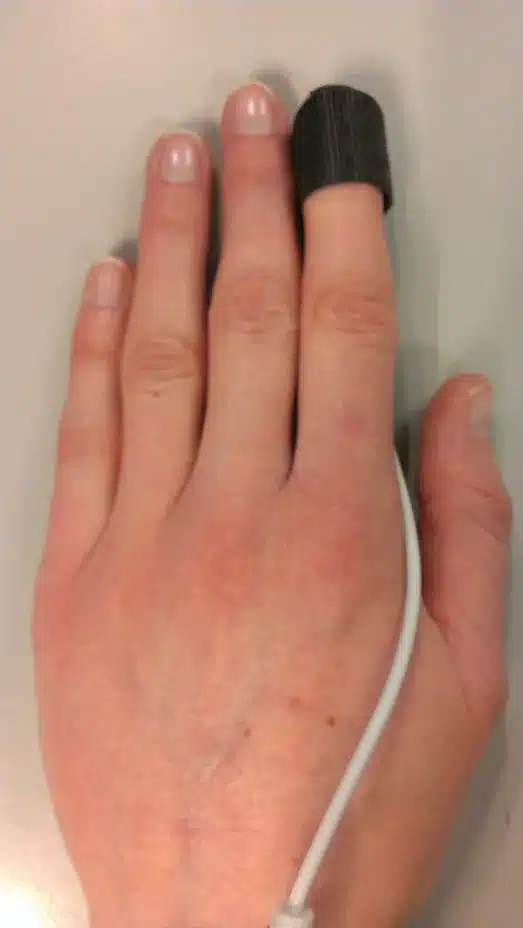
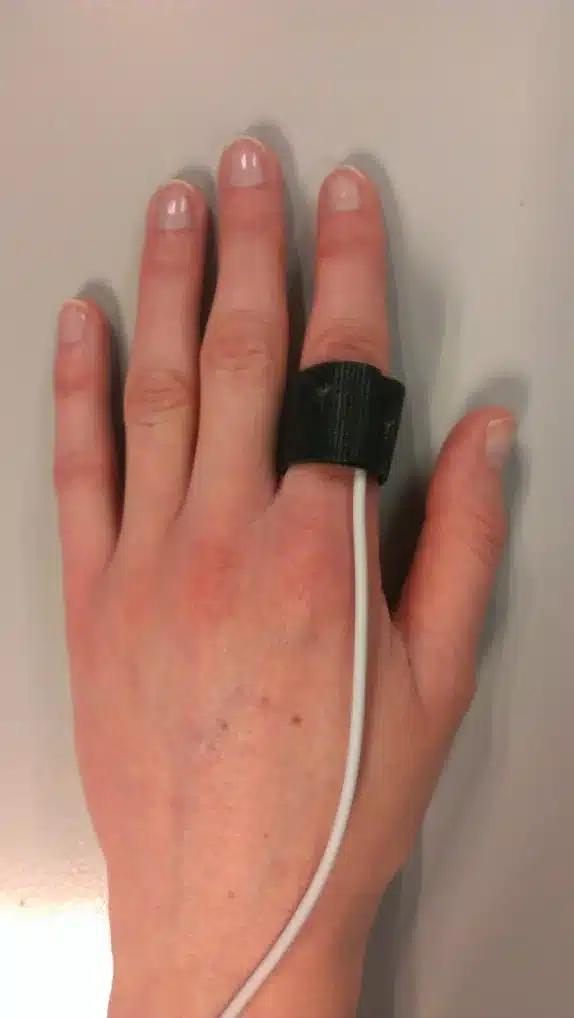
Figure 3‑2: Example finger sensor positioning for Optical Pulse measurement
4. Using the 3.5mm jack interface on Shimmer expansion boards
The Shimmer GSR+ and PROTO3 modules have a 3.5 mm 4-position jack that can be used to interface external sensors with analog or digital channels on the Shimmer. In order to use these jacks for the Optical Pulse Sensor, the channels must be configured for analog input. Please see the relevant expansion board user guide for more information.
The 3.5mm jack includes a 3V connection which provides power to the Optical Pulse Sensor; this can be enabled or disabled, as necessary, via the Shimmer3 firmware.
4.1. Optical Pulse Sensing via Shimmer GSR+ Module
Using the Optical Pulse Sensor with the Shimmer GSR+ Module extends the capability of the GSR+ Module to provide a comprehensive emotional response solution.
The Shimmer Optical Pulse Sensor has the PPG signal connected to pin 3 of the 3.5mm connector. When used with the Shimmer GSR+ Module, the PPG signal will be connected to the A13 channel of the Shimmer ADC. The Shimmer GSR+ Module should be used in analog configuration when the Optical Pulse Sensor is connected. See the Shimmer GSR+ User Guide for more details.
The 3V expansion power pin must be enabled for data acquisition from the Optical Pulse Sensor. This can be achieved via Shimmer software or any of the Shimmer APIs (available for LabVIEW, MATLAB, C# and Android). Please see the documentation for the relevant Shimmer API for details.
5. PPG to Heart Rate Conversion
The signal measured by the Shimmer Optical Pulse Sensor is a photoplethysmogram (PPG). An example of what this signal should look like is provided in Figure 5‑1. The figure clearly shows that the signal has one distinct peak for each pulse and a relatively low amplitude in between pulses. Significant variation can be seen in the amplitude of the pulse peaks; this is largely due to respiration in the case of the data shown. Other factors can also affect the signal amplitude and the relative height of the peaks, for example, muscle activity or movement at the sensing location and how securely the probe is attached to the sensing location.
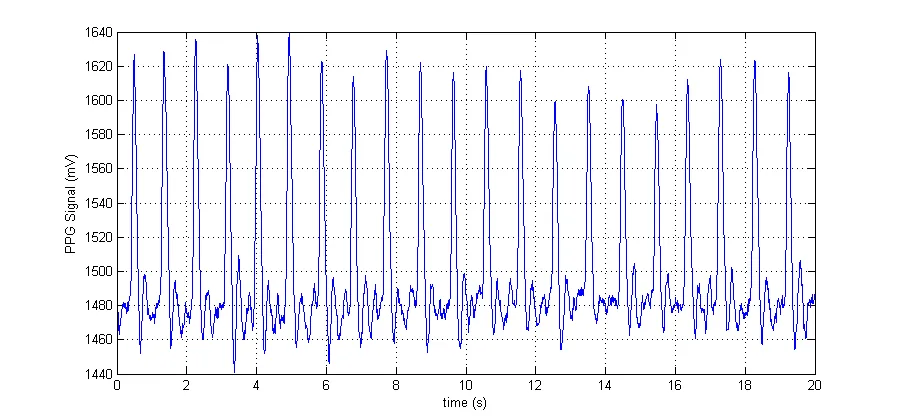
Figure 5‑1 Example PPG Signal measured from Shimmer Optical Pulse Sensor
In order to convert the PPG signal to an estimate of heart rate (HR), the individual pulses must be identified from the PPG signal and the time between successive pulses measured. It is very easy to visually identify the pulses from the example shown in Figure 5‑1, which has a good quality signal.
A simple threshold-crossing technique is not sufficiently robust for the purpose of converting PPG signals to HR, due to variations in the pulse amplitude, due to the afore-mentioned factors. There are many algorithms for conversion of PPG to HR available in the published literature; some examples can be found in (Lao, et al., 2013), (Fu, Liu, & Tang, 2008) (Shin, Lee, & Lee, 2009).
5.1. ConsensysPRO – PPG to HR
Shimmer has developed an algorithm that carries out a PPG-to-HR conversion, in order to facilitate plug-and-play use of the Optical Pulse Sensor.
The ConsensysPRO software allows data to be acquired from one or more Shimmer3 devices, displayed on screen and written to a file. If the Shimmer device is configured to stream PPG data on one of the internal expansion analog channels, the PPG signal will be converted to an estimate of heart rate. The estimated heart rate will be graphically displayed and can written to a file along with the other data channels from the Shimmer device.
Please refer to the Consensys User Guide for more details (available in the downloads section on Shimmer’s website)
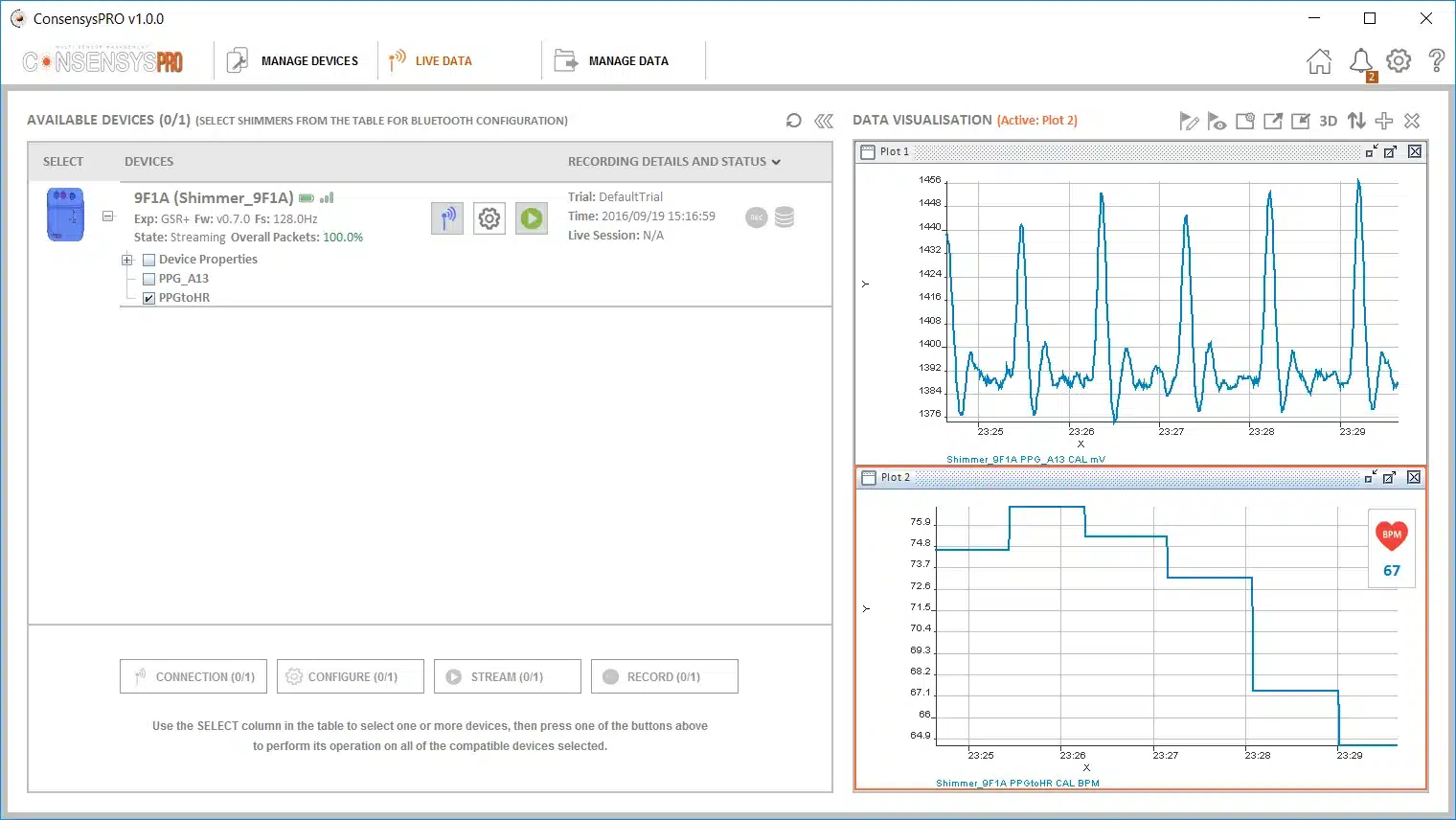
Figure 5-1 ConsensysPRO – PPG to HR algorithm using the finger optical pulse sensing probe
6. Hardware Considerations
6.1. Board Layout
Figure 6‑1 and Figure 6‑2 show the board layout for the Shimmer Optical Pulse Sensor, with components labelled. The LED and light sensing components are labelled D1 and U2, respectively. Note that the skin-sensor interface side should be protected with a transparent plastic film, to prevent damage to the electronics caused by sweat or other compounds on the skin’s surface.
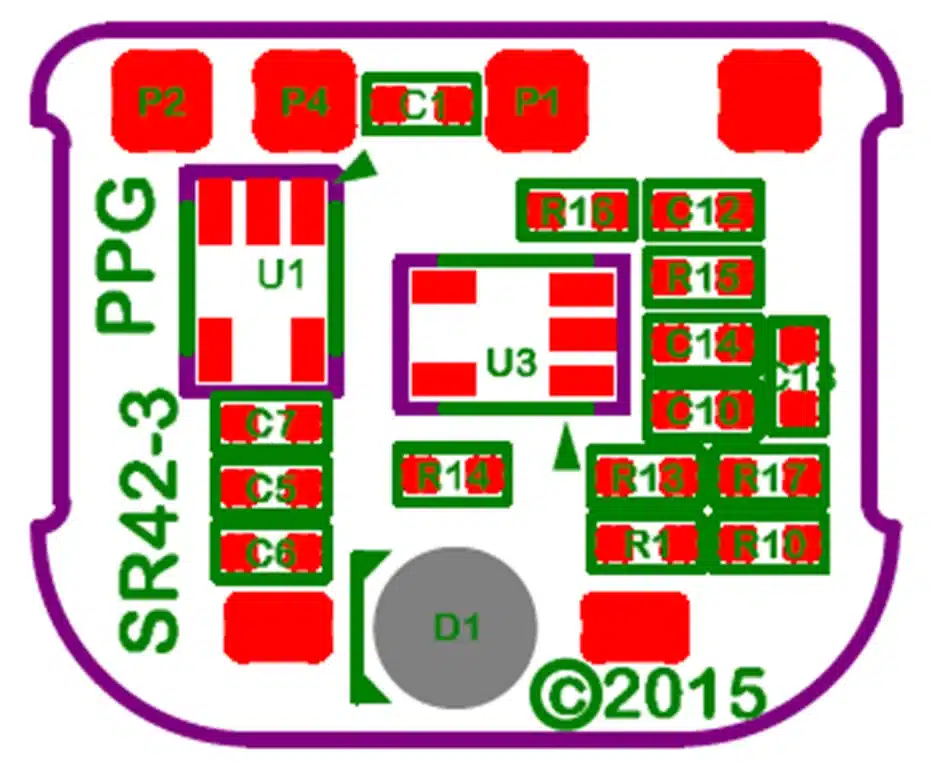
Figure 6‑1: Optical Pulse Board Layout (electronics side)
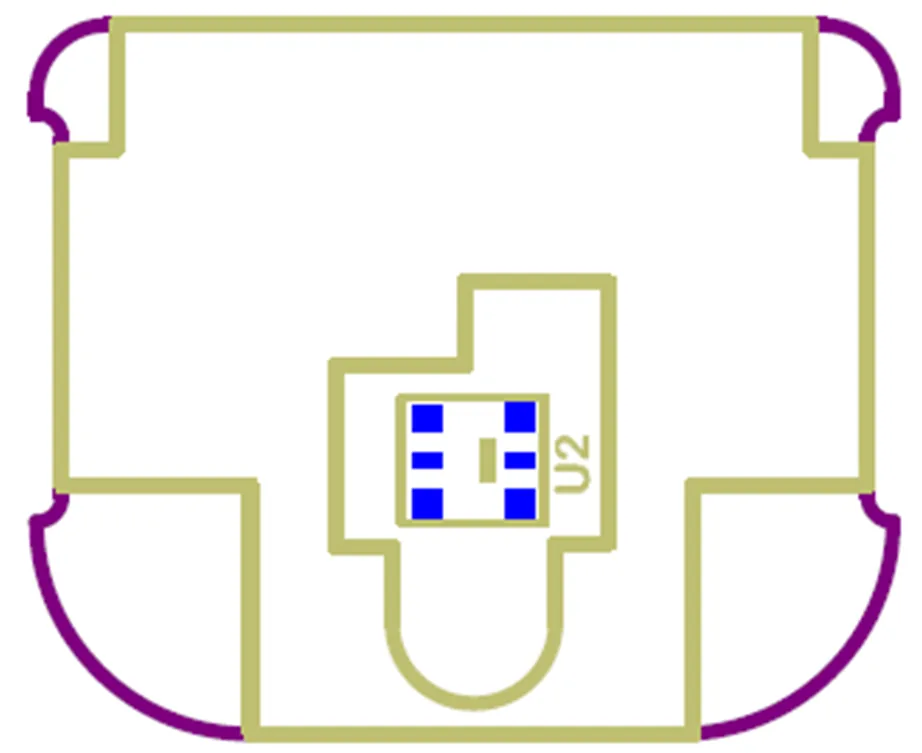
Figure 6‑2: Optical Pulse Board Layout (skin-sensor interface side)
6.2. Connections
Table 6‑1 lists the connections on the 3.5mm jack. Table 6‑2 provides further detail on the channel on which the PPG signal can be read for different Shimmer Expansion Boards. Please see relevant expansion board user guide for more details.
| Pin | Label | Function | Notes |
|---|---|---|---|
| 1 | Sleeve | GND | – |
| 2 | Tip | Signal | Connected to analog ADC channel of Expansion board as listed in Table 6‑2. |
| 3 | Ring 1 | N/A | Not Connected. |
| 4 | Ring 2 | PV | If expansion power enabled on GSR+ or PROTO3 Deluxe Expansion Board, 3V is provided to power the probe. |
Table 6‑1 Connections for 3.5mm 4-position jack (J3)
| Expansion Board and Connector | Signal Channel |
|---|---|
| GSR+ Expansion Board 3.5mm jack (J3) | ADC13 |
| PROTO3 Deluxe Expansion Board (J3) | ADC13 |
| PROTO3 Deluxe Expansion Board (J5) | ADC1 |
Table 6‑2 PPG signal channel for Expansion Boards
7. References
Fu, T.-H., Liu, S.-H., & Tang, K.-T. (2008). Heart Rate Extraction from Plotopletyhsmogram Waverform Using Wavelet Multi-resoultion Analysis. Journal of Medical and Biological Engineering, 28(4), 229 – 232.
Lao, C. K., Che, U. K., Chen, W., Pun, S. H., Mak, P. U., Wan, F., & Vai, M. I. (2013). Portable Heart Rate Detector Based on Photoplethysmography with Android Programmable Devices for Ubiquitous Health Monitoring System. International Journal of Advances in Telecommunications, Electrotechnics, Signals and Systems, 2(1).
Shin, H. S., Lee, C., & Lee, M. (2009). Adaptive treshold method for the peak detection of photoplethysmographic waveform. Computers in Biology and Medicine, 39, 1145 – 1152.
Legal notices
Legal Notices and Disclaimer
Redistribution IS permitted provided that the following conditions are met:
Redistributions must retain the copyright notice, and the following disclaimer. Redistributions in electronic form must reproduce the above copyright notice, this list of conditions and the following disclaimer in the documentation and/or other materials provided with the document.
Neither the name of Shimmer Research, or Realtime Technologies Ltd. nor the names of its contributors may be used to endorse or promote products derived from this document without specific prior written permission.
THIS DOCUMENT IS PROVIDED BY THE COPYRIGHT HOLDERS AND CONTRIBUTORS “AS IS” AND ANY EXPRESS OR IMPLIED WARRANTIES, INCLUDING, BUT NOT LIMITED TO, THE IMPLIED WARRANTIES OF MERCHANTABILITY AND FITNESS FOR A PARTICULAR PURPOSE ARE DISCLAIMED. IN NO EVENT SHALL THE COPYRIGHT OWNER OR CONTRIBUTORS BE LIABLE FOR ANY DIRECT, INDIRECT, INCIDENTAL, SPECIAL, EXEMPLARY, OR CONSEQUENTIAL DAMAGES (INCLUDING, BUT NOT LIMITED TO, PROCUREMENT OF SUBSTITUTE GOODS OR SERVICES; LOSS OF USE, DATA, OR PROFITS; OR BUSINESS INTERRUPTION) HOWEVER CAUSED AND ON ANY THEORY OF LIABILITY, WHETHER IN CONTRACT, STRICT LIABILITY, OR TORT (INCLUDING NEGLIGENCE OR OTHERWISE) ARISING IN ANY WAY OUT OF THE USE OF THIS DOCUMENT, EVEN IF ADVISED OF THE POSSIBILITY OF SUCH DAMAGE.