

Measuring Web Streaming Engagement with Shimmer3R and a Chrome Extension
We built a proof-of-concept Chrome extension that combines biometric sensing with real-world media consumption. The idea is straightforward: record physiological signals while someone watches a streaming video in the browser, and timestamp those signals with exactly what is being played. This allows us to explore audience engagement at a much finer granularity than traditional analytics.
Using the shimmer3r.js API, the extension streams GSR and PPG data from a Shimmer3R device over Bluetooth. At the same time, the extension observes the active web player and continuously tags each sensor sample with contextual metadata such as the content title and the current playback time.
The result is a synchronized dataset linking biometric response directly to on-screen content.
How It Works (High Level)
The Chrome extension runs alongside browser-based playback and performs three key tasks:
- Monitors the currently playing web video and its playback position
- Streams biometric data from a connected Shimmer3R device
- Merges both streams into a single, time-aligned record
This makes it possible to later reconstruct how physiological responses change across different moments in a viewing session.
Demo: Live Engagement Tracking During the Super Bowl Halftime Show
Below is a short demonstration of the extension running while a YouTube stream of the Super Bowl Halftime Show is playing. The video shows biometric data being recorded in real time while playback continues normally. The companion panel updates continuously as the video progresses, illustrating how physiological responses can be mapped directly to specific segments of the performance
Demo: Exporting Data to CSV
At the end of the viewing session, the companion allows exporting the recorded dataset. The following clip demonstrates exporting the session data to a CSV file immediately after the halftime show concludes.
Example Output
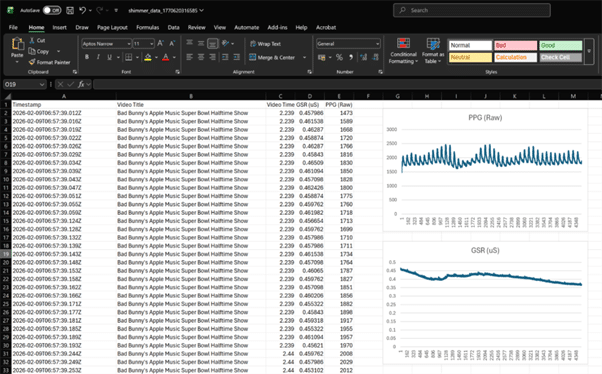
Below is a screenshot of the exported CSV dataset. Each row represents a biometric sample that has been tagged with the corresponding YouTube playback context. This structure allows straightforward downstream analysis, visualization, or integration into larger analytics pipelines.
Current Limitations
As with most early prototypes, there are a few important caveats.
Device connection flow
The extension currently opens a separate browser tab to establish the Bluetooth connection with the Shimmer device. Ideally, this would remain fully contained within the extension panel itself, but Chrome’s Web Bluetooth constraints make this non-trivial. It remains unclear whether a clean, in-panel connection flow is technically feasible.
Timestamp granularity mismatch
Shimmer sensors sample at a much higher rate than the video timestamps exposed by the YouTube player. As a result, multiple biometric samples often share the same video playback time. This is expected behavior, but it does mean downstream analysis needs to account for repeated video timestamps.
Advertisement visibility
Advertisements can be detected, but identifying which advertisement is being shown is currently limited. Being able to extract richer ad metadata would significantly enhance engagement analysis for sponsored content.
Player metadata availability
Across web streaming platforms, key metadata (especially titles) may only be present when on-screen controls are visible, or may be rendered dynamically in ways that are difficult to scrape reliably. In our current implementation, Netflix works, but the title is only reliably visible when the playback toolbar is on-screen—so the extension may temporarily fall back to a generic platform label when the UI fades. This can be improved by capturing metadata opportunistically (e.g., whenever controls appear) and persisting the last-known value until a new one is observed.
Where This Could Go Next
The natural next step is a cloud-backed architecture. With a backend in place, data from multiple users could be aggregated to:
- Compare engagement patterns across different videos
- Identify consistently high-response segments
- Analyse audience reactions to specific content types or ads
At that point, individual sensing sessions become part of a much larger audience-level signal.
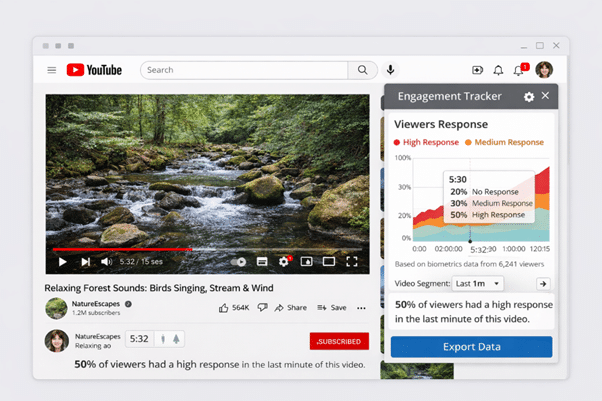
To help visualise this direction, we’ve attached a generated mock image that illustrates how aggregated audience engagement insights could eventually be presented. Please mind the obvious mistakes in the image — the intention is simply to convey the overall concept.
While our demonstrations have focused on specific web players, the broader direction is platform-agnostic: any browser-based streaming experience becomes a candidate as long as the player exposes enough playback context to be observed. .
Closing Thoughts
This prototype demonstrates how wearable sensors, browser extensions, and web streaming playback can be combined into a unified engagement measurement system. While there are still technical and UX challenges to solve, the foundation is there for scalable, biometric-driven audience analytics.
The mock interface above reflects the possible future — transforming raw physiological signals into meaningful insight on how audiences respond to digital content.
If this is an area you are exploring or if you are interested in collaborating, feel free to contact us.